[FREE] VOID WEBSAMPLER: Real-time Web Sampling & Spectral Warping Engine

Learn about building and using Max for Live devices.
Post Reply
julienb
Posts: 1843
Joined: Sat Oct 29, 2005 1:15 pm
Location: France
Contact:

[FREE] VOID WEBSAMPLER: Real-time Web Sampling & Spectral Warping Engine

Post by julienb » Thu Apr 02, 2026 8:57 am

As an Ableton Certified Trainer and Max Certified Trainer, I am proud to share my latest development with the community: VOID WEBSAMPLER.

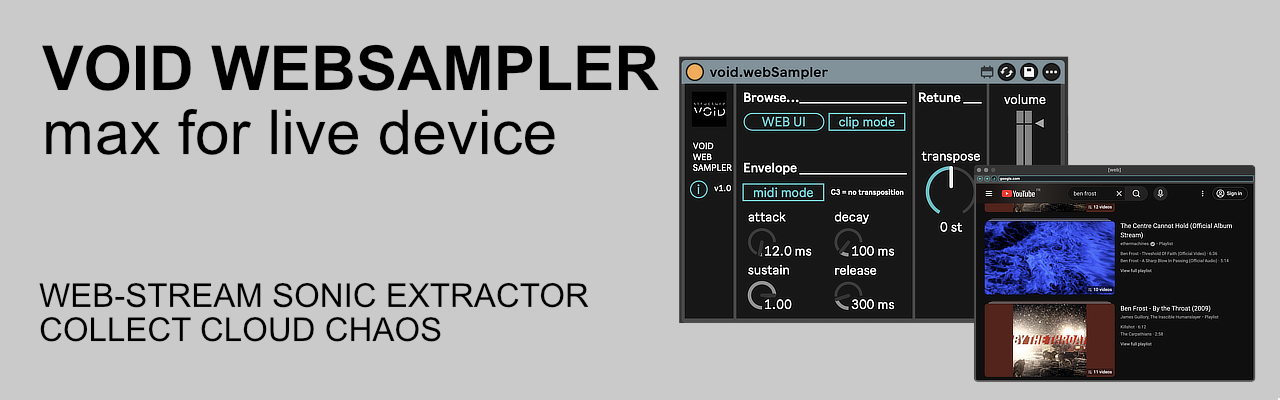
Image

This isn't just a simple audio player; it is a high-performance sampling interface designed to bridge the gap between world-wide web content and Ableton Live’s internal DSP.

Video : https://www.youtube.com/watch?v=wZReFg2oTUg

🔬 Technical Highlights & Features:
1. The Gateway: Web UI & Clip-Binding Automation
- Driven by a dedicated browsing engine, this device transforms any online resource into a manageable audio stream.
- URL HUD: Integrated cleaning engine automatically sanitizes raw text (fixing https:// and trimming artifacts).
- Clip Mode (Binding): When active, the device follows your performance. Simply rename any clip on the track with a website address; the sampler will instantly load that site the moment you launch the clip. This allows for seamless, automated sound source changes synchronized with your arrangement.

2. The Warp: Pitch & Ratio Shift (pfft~ Engine)
- MIDI Poly-Pitch: MIDI notes drive the transposition relative to C3 (Unity).
- Global Retune: A dedicated bipolar dial ranging from -24 to +24 semi-tones (2 octaves up/down).
- Spectral Exploration: At extreme ranges, the FFT bin shifting creates "Aliasing Artifacts" and "Spectral Smearing," resulting in metallic, robotic textures or deep, cavernous sub-frequencies.

3. The Shutter: Envelope-Gated Sampling
- MIDI Mode (Active): The sampler acts as a gated instrument. Each note triggers the ADSR envelope while simultaneously shifting the spectral content to the played pitch.
- Bypass Mode (Inactive): Continuous flow. The Retune dial becomes a manual frequency shifter for live performance or drone manipulation.

4. The HUD: Precision ADSR & Gain Stage
- Envelope HUD: Four dedicated dials (Attack, Decay, Sustain, Release) allow for precise temporal sculpting of the web stream, from sharp percussive transients to evolving ambient washes.
- Vertical Master Slider: A high-resolution output fader with an integrated peak indicator ensures optimal gain stages.

⚙️ Tech Specs:
Format: Max for Live Audio Effect (.amxd)
Requirements: Ableton Live Suite 12+ (or Standard with M4L add-on).

🚀 Get VOID WEBSAMPLER:
- EN: https://structure-void.com/tools/max-fo ... mpler-m4l/
- FR: https://structure-void.com/outil/max-fo ... mpler-m4l/

Discover our custom consulting & professional trainings (Available in French & English) at: https://structure-void.com

Thank you for supporting independent audio tool development. — Julien Bayle / Structure Void
Last edited by julienb on Thu Apr 02, 2026 1:29 pm, edited 1 time in total.
Julien Bayle
Art + Teaching/Consulting

Ableton Certified Trainer
Max Certified Trainer


Structure Void / Ableton Certified Training Center

Rivanni
Posts: 905
Joined: Sat Nov 26, 2016 12:30 pm

Re: [FREE] VOID WEBSAMPLER: Real-time Web Sampling & Spectral Warping Engine

Post by Rivanni » Thu Apr 02, 2026 11:32 am

The links are incorrect: error 404

https://structure-void.com/tools/max-fo ... mpler-m4l/ is the correct one.


The device works as advertised, but all the ads on YouTube spoil the fun, especially in 'clip mode'.
And when I click on a different timestamp in the video, it always restarts the video, including the ads that were already played.

Some text is very tiny and impossible to read, and I'm already at 125% zoom.

julienb
Posts: 1843
Joined: Sat Oct 29, 2005 1:15 pm
Location: France
Contact:

Re: [FREE] VOID WEBSAMPLER: Real-time Web Sampling & Spectral Warping Engine

Post by julienb » Thu Apr 02, 2026 1:54 pm

Rivanni wrote:
Thu Apr 02, 2026 11:32 am
The links are incorrect: error 404

https://structure-void.com/tools/max-fo ... mpler-m4l/ is the correct one.


The device works as advertised, but all the ads on YouTube spoil the fun, especially in 'clip mode'.
And when I click on a different timestamp in the video, it always restarts the video, including the ads that were already played.

Some text is very tiny and impossible to read, and I'm already at 125% zoom.
First, sorry for the dead link! Here is the right one:
👉 https://structure-void.com/tools/max-fo ... mpler-m4l/

About those YouTube Ads:
The struggle is real! Believe me, I wish I could inject a YouTube Premium sub into the patch, but even Max has its limits. 😉 We’re all just one "Skip Ad" away from spectral bliss.

UI Scale:
Point taken on the tiny text. I might have gone a bit too "minimalist-chic" there. I’ll look into making it more readable for the next update.

Thanks for the feedback—go warp some ghosts!
Julien Bayle
Art + Teaching/Consulting

Ableton Certified Trainer
Max Certified Trainer


Structure Void / Ableton Certified Training Center

[jur]
Site Admin
Posts: 6704
Joined: Mon Jun 01, 2015 3:04 pm
Location: Ableton

Re: [FREE] VOID WEBSAMPLER: Real-time Web Sampling & Spectral Warping Engine

Post by [jur] » Fri Apr 03, 2026 4:50 am

Sounds like a very fun idea.
Ableton Forum Moderator

julienb
Posts: 1843
Joined: Sat Oct 29, 2005 1:15 pm
Location: France
Contact:

Re: [FREE] VOID WEBSAMPLER: Real-time Web Sampling & Spectral Warping Engine

Post by julienb » Fri Apr 03, 2026 5:26 am

[jur] wrote:
Fri Apr 03, 2026 4:50 am
Sounds like a very fun idea.
Hi jur, thanks.
This is very simple.

I invite you to stay tuned as we are releasing some new devices each week.
Free (at least 90% of them), some are technical (cues & osc, midi monitoring, etc), some are more creative (midi beat repeat with custom C++ external making in zero latency accurate vs max native objects, etc)
Julien Bayle
Art + Teaching/Consulting

Ableton Certified Trainer
Max Certified Trainer


Structure Void / Ableton Certified Training Center

Post Reply