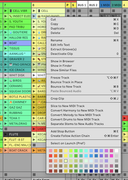
There may have been a reason for this, but it’s gone now. Up to MacOS 14 (Sonoma) it was possible to open contextual menus by enabling some Accessibility options in the OS settings. However, the way this option was implemented tended to open the contextual menu for the item underneath the mouse pointer rather than the menu for the real selected item (yes, the selected item isn’t always under the mouse pointer, especially if you’re using a device other than a trackpad or mouse to navigate the computer screen ; just goes to show that even the most renowned brands for accessibility, can still screw up).
Fortunately, this implementation has been fixed by Apple since macOS 15 (Sequoia) in 2024. The context menu for the real selected item can now be opened just by using the Ctrl + Enter shortcut.
But Ableton Live 12 does not support this new implementation, yet. While it would be so beneficial both for people with accessibility needs and for everyone else.