Share your favorite Ableton Live tips, tricks, and techniques.
-
dubatek
- Posts: 6
- Joined: Fri Oct 14, 2005 9:35 pm
- Location: Slovenia, EU
-
Contact:
Post
by dubatek » Sun Nov 12, 2006 10:07 pm
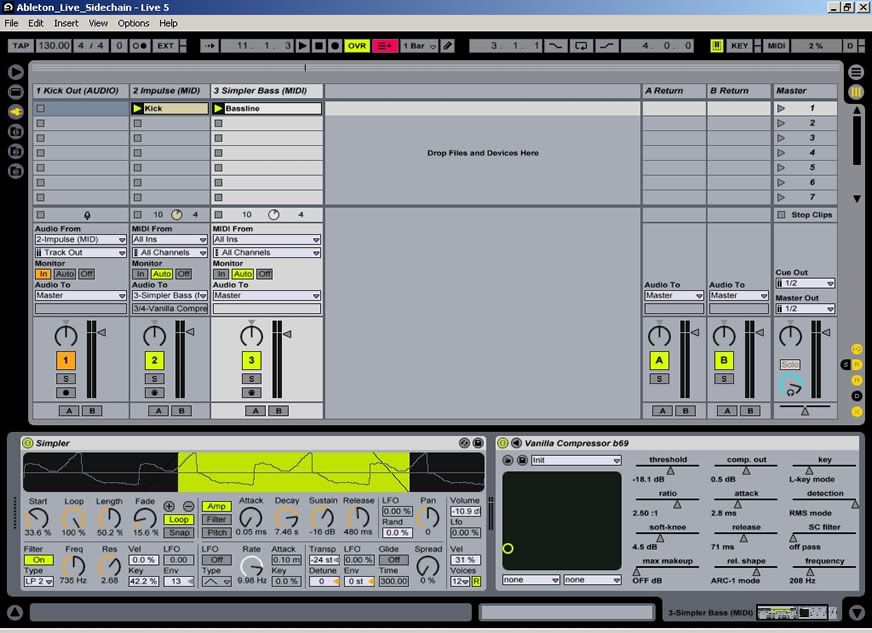
show to me an image of your sidechain routing in Live?
I use C1 and with
THIS trick don't work
Image 1
image 2
Please

and sorry for my english

-
geo
- Posts: 300
- Joined: Tue Mar 07, 2006 11:53 am
-
Contact:
Post
by geo » Sun Nov 12, 2006 10:49 pm
Good luck with it, I never worked it out. I use Compadre Beatpuncher with Live. Here is a link with tutorials, there is one that uses C1 with Cubase SX.
http://experimedia.net/page.php?id=102
-
forge
- Posts: 17422
- Joined: Wed Apr 21, 2004 9:47 am
- Location: Queensland, AU
-
Contact:
Post
by forge » Sun Nov 12, 2006 11:27 pm
what you need to do is pan the 2 tracks and then use a utility plug in to make the final summed mix mono
C1 can only be used mono for sidechaining and you do it by panning the signal you are sending to it hard left, then set the sidechain to left, then route it to the track the C1 is on and pan the track with the bass(or whatever) to the right then route it to the C1 track too and use a utility to make the resulting signal mono
I havent got it in front of me and I have a feeling I've missed something - but play about with that and you should be able to get it
thinking about it you may have to route the kick to it's own track or use a send set to PRE and route the return to a track to get the kick unaffected
I'll have a look when I get a chance because I cant quite remember but that should get you started
-
forge
- Posts: 17422
- Joined: Wed Apr 21, 2004 9:47 am
- Location: Queensland, AU
-
Contact:
Post
by forge » Mon Nov 13, 2006 1:00 am
here
tracks 2 and 3 are both routed to track 1 and the Kick is sending to return A
the return has a utility on it with the mono preset
BTW - in future it might be an idea to put the topic in the title - there are alot of posts made here and you'll get lost quickly! I nearly couldnt find this to post the pics


-
geo
- Posts: 300
- Joined: Tue Mar 07, 2006 11:53 am
-
Contact:
Post
by geo » Mon Nov 13, 2006 1:52 am
excellent, I tried it here and worked!
-
geo
- Posts: 300
- Joined: Tue Mar 07, 2006 11:53 am
-
Contact:
Post
by geo » Mon Nov 13, 2006 1:53 am
Noticed that you also put a utility plugin next to the C1 with a Panorma set to "Right"
-
forge
- Posts: 17422
- Joined: Wed Apr 21, 2004 9:47 am
- Location: Queensland, AU
-
Contact:
Post
by forge » Mon Nov 13, 2006 3:46 am
geo wrote:Noticed that you also put a utility plugin next to the C1 with a Panorma set to "Right"
yes - this is just to make it mono as without it you will hear it in the right channel - it will play only the right channel and make it mono
I'm glad this came up - is something I should use way more often
-
dubatek
- Posts: 6
- Joined: Fri Oct 14, 2005 9:35 pm
- Location: Slovenia, EU
-
Contact:
Post
by dubatek » Tue Nov 14, 2006 8:25 pm
Thanks guys,
I try tomorrow