-
timothyallan
- Posts: 5788
- Joined: Wed Nov 24, 2004 11:05 pm
- Location: Melbourne Australia
-
Contact:
Post
by timothyallan » Fri Feb 01, 2008 9:34 pm
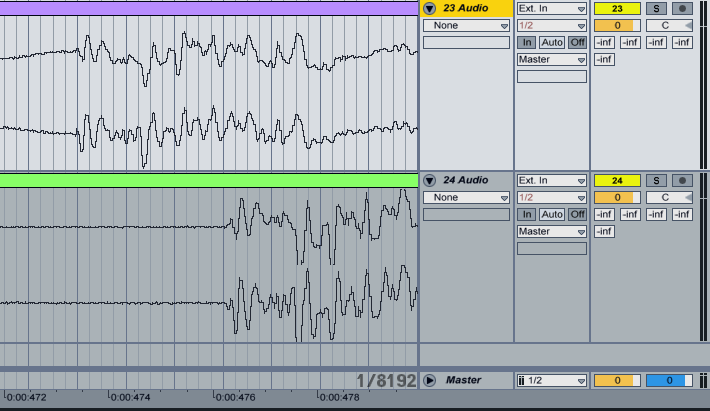
I have a bunch of tracks sending to a send C with any compressor/limiter vst on it (W1, Sonalksis etc) and I constatly get phasing. I rendered send C, then rendered the master and put the two tracks side by side in the project. As you can see, they are a few ms off. This wrecks parallel compression which worked great for me in Live 6

-
Electronathan
- Posts: 61
- Joined: Mon Jan 07, 2008 10:50 pm
- Location: Brooklyn, NY
-
Contact:
Post
by Electronathan » Sat Feb 02, 2008 6:27 pm
it would be best then to mix both the compressed and uncompressed signals through an effect rack, like in some of the "upward compression" presets on your return track. Delay compensation may need to be on, at least for the standard plug-in since it can have up to a 10ms lookahead.
-
timothyallan
- Posts: 5788
- Joined: Wed Nov 24, 2004 11:05 pm
- Location: Melbourne Australia
-
Contact:
Post
by timothyallan » Sat Feb 02, 2008 9:53 pm
Delay compensation is on, that's why I posted this issue.
Also, sending different %'s of 15 drum tracks to a single compressor is a big pain without using a send
-
Alex
- Posts: 4006
- Joined: Wed Apr 03, 2002 1:07 pm
- Location: Ableton Headquarter
Post
by Alex » Sat Feb 02, 2008 10:46 pm
timothyallan,
just to get sure... you have that problem in Live 7 but it works in Live 6?
In that case, could you provide us with a small Live 6 set demonstrating that issue and send it to
[email protected]?
Regards,
/Alex
-
timothyallan
- Posts: 5788
- Joined: Wed Nov 24, 2004 11:05 pm
- Location: Melbourne Australia
-
Contact:
Post
by timothyallan » Sun Feb 03, 2008 2:19 am
aha. The problem occurs if I have a track routed to a send that is also the input for another track. As soon as I set the first track to Master instead of the IN of another track, the send becomes locked in again.
I just need to adjust my routing I guess if I want to do parallel compression, or use a fancy rack setup and no send. Tried it on 6 and 7 with the same effect.
The other project which 'worked' in L6 did not have this extra track routing...
-
Amaury
- Posts: 5885
- Joined: Mon Mar 20, 2006 6:59 pm
- Location: Ableton Headquarters
-
Contact:
Post
by Amaury » Mon Feb 04, 2008 11:16 am
timothyallan wrote:aha. The problem occurs if I have a track routed to a send that is also the input for another track. As soon as I set the first track to Master instead of the IN of another track, the send becomes locked in again.
I just need to adjust my routing I guess if I want to do parallel compression, or use a fancy rack setup and no send. Tried it on 6 and 7 with the same effect.
The other project which 'worked' in L6 did not have this extra track routing...
Hi,
Just to make sure: is it only setting the "audio to" of track 1 to the track you send to the return (track 2) that give you this behaviour? What about the monitoring state, and/or the track arm status of that track 2 (the one where you use the send). Also, what about the "audio in" chooser of that track 2? Is it set to "none", or "Ext in"?
Regards,
Amaury
Ableton Product Team