Let's say I'm using an audio interface with only a stereo output. So I have nothing to assign ableton's cue monitor to that's separate from the mains. I know there's some way to aggregate audio devices, though I've never tried.
If one was to do such a thing with a mbp's built-in soundcard and a firewire device, could the mbp headphone outs then be used for cue?
Also, does everything run ok when aggregating devices. performance-wise?
cheers
OSX - Aggregate audio devices?/use laptop headphone for cue?
-
chrysalis33rpm
- Posts: 1020
- Joined: Wed Aug 11, 2004 9:56 pm
- Location: San Francisco
Yes, works great here with an Apogee Duet and an Imac G5 2.0 ghz. I was having problems (crackling or latency in the cue buss) with it until I added another gig of RAM (now I have 2 gb). I've been testing it for about 3-4 weeks with no problem.
You set up an aggregate device in Audio Midi prefs, its in a dropdown menu. This creates a virtual soundcard basically, which you can use in Live. FYI the Apogee folks told me to check the 'resample' box in the agg device window, although I can't see that it makes a difference.
You set up an aggregate device in Audio Midi prefs, its in a dropdown menu. This creates a virtual soundcard basically, which you can use in Live. FYI the Apogee folks told me to check the 'resample' box in the agg device window, although I can't see that it makes a difference.
-
Pitch Black
- Posts: 6722
- Joined: Sat Dec 21, 2002 2:18 am
- Location: New Zealand
- Contact:
No problems aggegating devices here. I used to do 8 + 2 outputs using my Fireface400 plus the Mac.
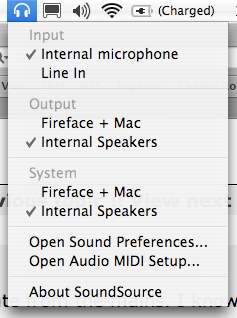
BTW, if you haven't seen it, SoundSource is a cool freeware app that gives you a drop-down selector menu for your audio hardware and quick access to audio and midi prefs from the finder menu bar. The aggregate device Fireface + Mac is shown in the pic. Very handy for switching between setups.
http://rogueamoeba.com/freebies/
BTW, if you haven't seen it, SoundSource is a cool freeware app that gives you a drop-down selector menu for your audio hardware and quick access to audio and midi prefs from the finder menu bar. The aggregate device Fireface + Mac is shown in the pic. Very handy for switching between setups.
http://rogueamoeba.com/freebies/