[Tutorial] Midi LFO for everyday people

Share your favorite Ableton Live tips, tricks, and techniques.
glamourboy
Posts: 253
Joined: Thu Jul 26, 2007 11:57 am
Location: Copenhagen

[Tutorial] Midi LFO for everyday people

Post by glamourboy » Tue Jul 29, 2008 11:53 am

Hi. Here's a way to modulate live parameters all within live (almost), using two vst plugins by "THE PIZ". It's my first tutorial ever, so please forgive any errors it may contain. This tutorial is for mac, but the plugins are available for pc as well (links at end of post).
feel free to ask questions, i'll answer best i can.
Enjoy.


1.
Download
http://www.thepiz.org/xt/midiOut.vst.zip
and
http://www.thepiz.org/xt/pizmidi20080203.dmg

Unzip/mount and install "midiOut.vst" and midiSimpleLfo.vst" to your VST folder.

2.
Go to "audio midi setup>midi devices>iac" and make sure you have at least one iac bus, and that "device is online".

3.
Open LIVE and go to "preferences>midi sync".
Set up live to recieve from iac like this:
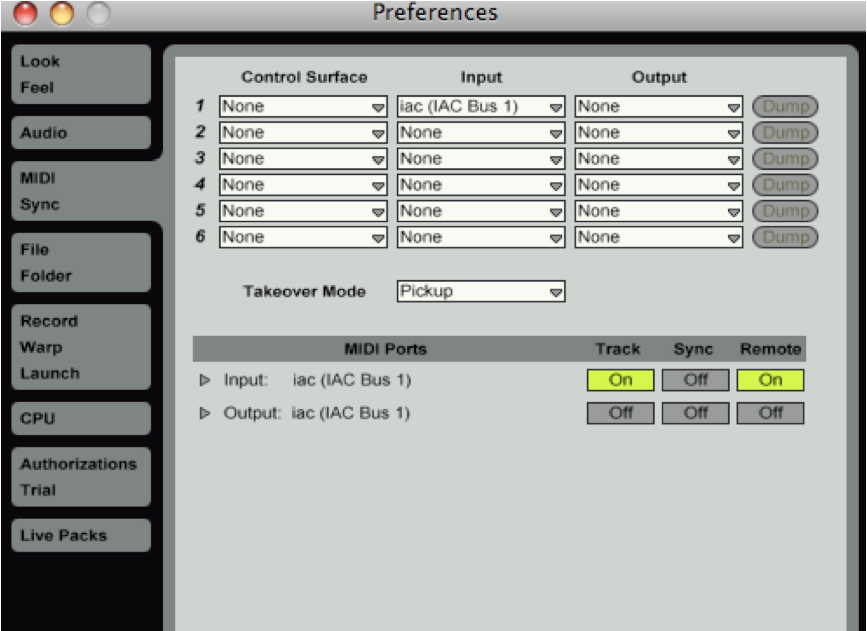
Image

4.
download, unzip and open:
http://www.mediafire.com/?khglwjdwrtc

5.
Now you have an instrument rack containing three lfo's. the first three macros turn them on and off.

switch off the second and third.
drop something in live you wish to modulate.
press command-m
pick the parameter you wish to modulate
press play
press stop
press command-m
press play

"LFO 0", the first of the lfo's within the instrument rack should now be modulating your parameter.

6.
repeat procedure for "LFO 1" and "LFO 2".
add more lfo's :-)


info:

the three "x" tracks recieve midi from the three lfo's respectively.

lfo's are set to midi channel 16 cc0, cc1, and cc2.

EDIT: the only thing that seems to crash the setup is if an lfo is set to "slow random". that will shut down my live soon as i press play.

live's undo function is crippled :-( it tries to undo the modulation one step at a time. guess everything has a price.

cpu usage on my mbp 2.33 duo is 5-6% with three lfo's running

as you may have noticed theres an "audio to cc" plugin in the vst pack. it works in a similar way. it just needs an audio input. not tested thoroughly.

Win:
Download
http://www.thepiz.org/xt/midiOut.zip
and
http://www.thepiz.org/xt/pizmidi20080610.zip
and
http://www.mediafire.com/?khglwjdwrtc
and
http://www.midiox.com/zip/MidiYokeSetup.msi


crazy big thanks to "THE PIZ"!
http://www.thepiz.org
the person who coded these babies.
Last edited by glamourboy on Mon Aug 04, 2008 1:44 pm, edited 2 times in total.

siliconarc
Posts: 2872
Joined: Mon Jul 16, 2007 12:27 pm
Location: UK
Contact:

Post by siliconarc » Sat Aug 02, 2008 6:35 pm

this looks sweet - i'd really like to see this working, but i'm not about to give away my phone number to get a password to download the fkn thing - i get enough spam texts as it is!

could you put your file on mediafire or something?

cheers

glamourboy
Posts: 253
Joined: Thu Jul 26, 2007 11:57 am
Location: Copenhagen

Post by glamourboy » Mon Aug 04, 2008 1:42 pm

garyboozy wrote:this looks sweet - i'd really like to see this working, but i'm not about to give away my phone number to get a password to download the fkn thing - i get enough spam texts as it is!

could you put your file on mediafire or something?

cheers
phew.
thought i'd made one of those topics that no one replies to because it's just too lame.
sorry about the bad link, changed it to mediafire. let me know how it works for you.

pepezabala
Posts: 3503
Joined: Mon Jun 07, 2004 4:29 pm
Location: In Berlin, finally

Post by pepezabala » Tue Aug 05, 2008 7:24 am

I will definetly giveit a try when at home again. phew, I hate being at work.

siliconarc
Posts: 2872
Joined: Mon Jul 16, 2007 12:27 pm
Location: UK
Contact:

Post by siliconarc » Wed Aug 06, 2008 10:04 pm

thanks for the re-pack. i actually got this up and running on my own when i thought you'd forgotten about the thread! good to see how you've set it up, though.

rather than the piz lfo, i used the audio2cc plug, but its a similar setup. when it wasnt crashing, it worked a treat, but i ended up trashing the plugs in the end, as they're way too unstable for use atm. also, i kept forgetting to turn off the plz plugs when in midi-map mode, so random dials & faders would become assigned - even the midi map switch itself :?

still, a cool trick which i know is now possible, so cheers for the headsup on the plugs :)

glamourboy
Posts: 253
Joined: Thu Jul 26, 2007 11:57 am
Location: Copenhagen

Post by glamourboy » Wed Aug 06, 2008 10:14 pm

i see what you mean. the audio2cc crashes a lot for me too, but the lfo is quite stable on my rig. and you can always record the midi and trash the plugs. it makes me wonder how the abes are going to handle it when they get around to making an lfo.

Tweaking Knobs
Posts: 1162
Joined: Fri Jun 09, 2006 5:36 pm
Location: Berlin
Contact:

Post by Tweaking Knobs » Fri Oct 31, 2008 9:08 am

glamourboy wrote:i see what you mean. the audio2cc crashes a lot for me too, but the lfo is quite stable on my rig. and you can always record the midi and trash the plugs. it makes me wonder how the abes are going to handle it when they get around to making an lfo.
I guess they will never implement lfo's n live.

Tweaking Knobs
Posts: 1162
Joined: Fri Jun 09, 2006 5:36 pm
Location: Berlin
Contact:

Post by Tweaking Knobs » Fri Oct 31, 2008 9:10 am

Tweaking Knobs wrote:
glamourboy wrote:i see what you mean. the audio2cc crashes a lot for me too, but the lfo is quite stable on my rig. and you can always record the midi and trash the plugs. it makes me wonder how the abes are going to handle it when they get around to making an lfo.
I guess they will never implement lfo's n live, anyway , man i may be blind, but icant find the Audio midi setup/midi devices, where is that ? is that thing in preferences ?

in preferences altough i have everything installed i cannot change it to iac.

where is the Audio midi setup/midi devices?

thanx !

siliconarc
Posts: 2872
Joined: Mon Jul 16, 2007 12:27 pm
Location: UK
Contact:

Post by siliconarc » Fri Oct 31, 2008 12:34 pm

IAC is mac only.
Go to: applications > utilities > audio midi setup
If you're pc, use midiyoke.

Jekblad
Posts: 2353
Joined: Tue May 13, 2008 2:02 am
Contact:

Post by Jekblad » Sun Nov 02, 2008 4:25 am

can't wait to try this out!

yay random!
2.4 ghz Macbook Pro 8gb RAM, SSD, Live 9 Suite, Puremagnetik, Minimal Talent

zi
Posts: 10
Joined: Sun Jan 23, 2005 5:03 am

Post by zi » Fri Jan 09, 2009 1:45 am

great

insertpizhere
Posts: 1
Joined: Wed Jan 14, 2009 10:05 pm
Contact:

Post by insertpizhere » Thu Jan 15, 2009 6:47 pm

hi.

just thought i'd mention that the versions of my plugins linked here are old, so if you've had crashes, they've probably been fixed. in particular there were major bugs fixed in the audio to cc plugin, as well as the lfo.

my site usually has links to the latest versions:
http://thepiz.org/dl/?p=vst#pizmidi

have fun!

logman
Posts: 151
Joined: Thu Jul 22, 2004 5:43 am

If you like...

Post by logman » Thu Jan 15, 2009 11:44 pm

In live 7, you could use the external instrument device instead of the MidiOut VST to feed out to the IAC/MIDI OX bus. Thank piz for writing MIDI plug-ins for Mac - I'll have to give them a shot.

djgroovy
Posts: 2025
Joined: Thu Sep 28, 2006 12:15 pm
Location: Portugal

Post by djgroovy » Wed Jan 21, 2009 4:48 pm

Yeah, thanks, piz! 8)

glamourboy
Posts: 253
Joined: Thu Jul 26, 2007 11:57 am
Location: Copenhagen

Post by glamourboy » Wed Jan 21, 2009 10:03 pm

i'm thinking: lfo's with max for live should be a breeze, no?

Post Reply