Discuss music production with Ableton Live.
-
fuzzyhead
- Posts: 96
- Joined: Fri Sep 14, 2007 12:40 pm
- Location: Froggystan
Post
by fuzzyhead » Tue Nov 25, 2008 5:53 pm
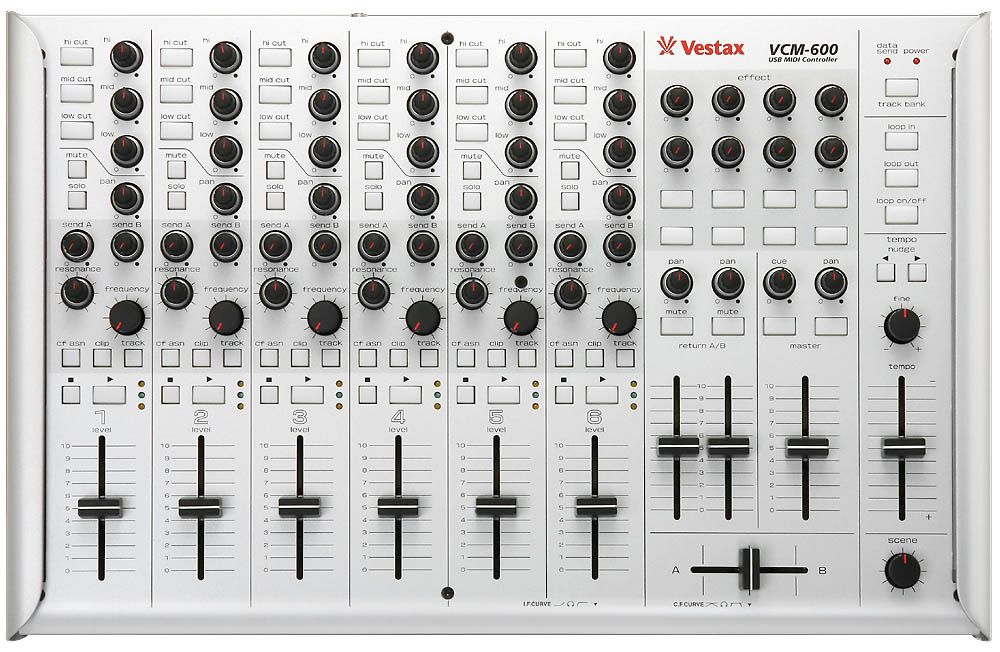
This picture is up to date, the previous one is older (changed 3 times)
-
madhattared
- Posts: 308
- Joined: Tue Feb 12, 2008 1:13 am
- Location: Brooklyn
Post
by madhattared » Fri Nov 28, 2008 12:10 am
where is the headphone jack?

Live 7 hackintosh 10.5.2 q6600 raptor 4gig x3d pk FW410 bcr2k xboard49 Ultrasone DJ1 BM5a
-
Chris J
- Posts: 1353
- Joined: Wed Aug 04, 2004 5:24 pm
Post
by Chris J » Mon Dec 01, 2008 1:24 pm
bugs in 0.12
you copy a section, if you do certain actions before pasting, like pressing stop to go back to zero , or click on a marker to go at a specific position, there's no pasting, it's gone from the RAM.
and the ever popular Midi Overdub doesn't work
Quad 6600 Intel, AsusP5Q, 2Gb ram, XP sp3, Evolution MK361c & UC33e, Line6 UX8
-
Hervé
- Posts: 413
- Joined: Thu Sep 30, 2004 5:13 am
-
Contact:
Post
by Hervé » Tue Dec 02, 2008 3:50 pm
madhattared wrote:where is the headphone jack?
On your soundcard, it's a midi controller !

-
misteron
- Posts: 506
- Joined: Fri Mar 21, 2008 2:28 am
Post
by misteron » Wed Dec 03, 2008 6:03 pm
Chris J wrote:bugs in 0.12
you copy a section, if you do certain actions before pasting, like pressing stop to go back to zero , or click on a marker to go at a specific position, there's no pasting, it's gone from the RAM.
and the ever popular Midi Overdub doesn't work
Anyone else getting these issues?
MBP 2.4GHz, 4Gb RAM, OSX 10.5.5, Live7Suite, Motu Ultralite Mk3, ADAM p11A
-
siddhu
- Posts: 568
- Joined: Sun Jun 29, 2003 10:39 am
- Location: surface of the earth
-
Contact:
Post
by siddhu » Wed Dec 03, 2008 7:13 pm
Chris J wrote:bugs in 0.12
you copy a section, if you do certain actions before pasting, like pressing stop to go back to zero , or click on a marker to go at a specific position, there's no pasting, it's gone from the RAM.
and the ever popular Midi Overdub doesn't work
Happened to me also.
-
[dfi]
- Posts: 193
- Joined: Tue Feb 19, 2008 8:15 am
- Location: Ableton Headquarters
-
Contact:
Post
by [dfi] » Wed Dec 03, 2008 8:24 pm
Hi Misteron and Siddhu
We had this issue in the Bugs & Problems forum too. This is what my colleague Jörg said:
there´s nothing wrong with with Copy&Paste, it just functions as specified:
Before your can paste anything, the insert mark needs to be in focus.
If you click the Global Stop Button, the focus is on the transport, you can´t paste anything to the transport.
If you click a marker, you can see that the focus is not on the track anymore but on the marker.
Simply click into track display to place the insert mark, you´ll be able to paste anywhere. Nothing is lost in the RAM.
Best regards,
Jörg
If that is not what you experience, please let me know!
best,
dfi
-
Crash
- Posts: 805
- Joined: Fri Sep 19, 2008 4:06 pm
- Location: Nowhereland
Post
by Crash » Wed Dec 03, 2008 9:02 pm
[dfi] wrote:If that is not what you experience, please let me know!
That is not what I experience.
While Live is busy with Copy or Paste operation of memory intensive tracks the
keyboard controls don't work anymore until
some time after the operation is completed. That means you cannot use cursor-keys, del, space and neither
ctrl-v (Paste on Windows).
The mouse on the other hand is still perfectly useable, including chosing Paste operations while the keys are still disabled (that is why I wrote "some time after").
I reported problems with that as early as last January but obviously no one at Ableton took a closer look at it since then.
HAL: I know I've made some very poor decisions recently, but I can give you my complete assurance that my work will be back to normal. I've still got the greatest enthusiasm and confidence in the mission. And I want to help you.
-
siddhu
- Posts: 568
- Joined: Sun Jun 29, 2003 10:39 am
- Location: surface of the earth
-
Contact:
Post
by siddhu » Wed Dec 03, 2008 9:20 pm
I've noted some really wild tempo fluctuations with Live in Slave mode with this release that did not happen in 7.010.
The slave computer was constantly jumping +/- about 2 BPM's when synching from a master.
Chain was Master > USB Midi Interface > Cable > USB Midi Interface > Slave
Both computers were running 7.012.
7.012 went absolutely crazy when midi synching over ethernet.
Tempos jumping to 800 BPM then dropping to 50. Basically it was as if it was generating/receiving totally random numbers for the BPM.
The transport controls displayed the same behavior.
Switching both machines back to 7.010 stabilised and solved the problems.
Normal USB midi chain works without any fluctuations, and the ethernet midi synch works.
-
Crash
- Posts: 805
- Joined: Fri Sep 19, 2008 4:06 pm
- Location: Nowhereland
Post
by Crash » Wed Dec 03, 2008 9:36 pm
siddhu wrote:I've noted some really wild tempo fluctuations with Live in Slave mode with this release that did not happen in 7.010.
...
Switching both machines back to 7.010 stabilised and solved the problems.
It may be hard to believe but that happens because .12 solved a bug with Live's Sync Slave behavior. Before .12 Live rounded incoming Sync Clock tempo roughly to full integer values and used that both for external plugins and it's own clip playback (at least with Warp enabled clips). It's good to have that bug removed, because it led to problems when the Master tempo shifted only slightly (ran at some non-integer tempo for a short time) and thus the Master and Slave could run out of Sync after some time.
The problem with .12 is that it's Sync Slave tempo calculation is so unbelieveably lousy that you can hardly use it anymore. Ableton knows about it and hopefully fixes it with the next update ASAP. Unfortunately they didn't care to publish that known flaw in their changelog or non-existant release notes. So you had to fall into that pit and climb out yourself only because there was no sign. Sorry.
The following screenshot demonstrates a comparison between Kore + Kontakt vs. Live + Kontakt running as Slaves from the very same Master Clock at supposely 333 bpm:

HAL: I know I've made some very poor decisions recently, but I can give you my complete assurance that my work will be back to normal. I've still got the greatest enthusiasm and confidence in the mission. And I want to help you.
-
siddhu
- Posts: 568
- Joined: Sun Jun 29, 2003 10:39 am
- Location: surface of the earth
-
Contact:
Post
by siddhu » Sun Dec 07, 2008 1:09 am
Crash wrote:siddhu wrote:I've noted some really wild tempo fluctuations with Live in Slave mode with this release that did not happen in 7.010.
...
Switching both machines back to 7.010 stabilised and solved the problems.
It may be hard to believe but that happens because .12 solved a bug with Live's Sync Slave behavior. Before .12 Live rounded incoming Sync Clock tempo roughly to full integer values and used that both for external plugins and it's own clip playback (at least with Warp enabled clips). It's good to have that bug removed, because it led to problems when the Master tempo shifted only slightly (ran at some non-integer tempo for a short time) and thus the Master and Slave could run out of Sync after some time.
The problem with .12 is that it's Sync Slave tempo calculation is so unbelieveably lousy that you can hardly use it anymore. Ableton knows about it and hopefully fixes it with the next update ASAP. Unfortunately they didn't care to publish that known flaw in their changelog or non-existant release notes. So you had to fall into that pit and climb out yourself only because there was no sign. Sorry.
The following screenshot demonstrates a comparison between Kore + Kontakt vs. Live + Kontakt running as Slaves from the very same Master Clock at supposely 333 bpm:
Well this really needs to be sorted out because how can you play a gig as an "electronic band" using multiple computers if the tempo sync keeps fluctuating wildly!?
I mean Live is supposed to be a "live performance instrument" and should have industry leading tightness when it comes to sync.
-
ddr400
- Posts: 24
- Joined: Mon Nov 26, 2007 8:15 am
- Location: Russia, Moscow
Post
by ddr400 » Fri Dec 12, 2008 7:36 am
siddhu wrote:I've noted some really wild tempo fluctuations with Live in Slave mode with this release that did not happen in 7.010.
The slave computer was constantly jumping +/- about 2 BPM's when synching from a master.
Chain was Master > USB Midi Interface > Cable > USB Midi Interface > Slave
Both computers were running 7.012.
7.012 went absolutely crazy when midi synching over ethernet.
Tempos jumping to 800 BPM then dropping to 50. Basically it was as if it was generating/receiving totally random numbers for the BPM.
The transport controls displayed the same behavior.
Switching both machines back to 7.010 stabilised and solved the problems.
Normal USB midi chain works without any fluctuations, and the ethernet midi synch works.
yes.
i got total desync with my machinedrum. Live as master.
back to 7.0.10
-
beatnick
- Posts: 66
- Joined: Mon May 30, 2005 11:50 pm
- Location: Melbourne, Australia
-
Contact:
Post
by beatnick » Sun Dec 14, 2008 10:44 pm
Bargh! The sync issue has totally rendered my live set unplayable!!!
I need to backtrack to 7.0.10 but ableton don't have previous version for download.
Any help???
Nick.