is there a way to fade-out the previous scene when changing to the next scene without a pre-produced fade?
ideally it would immediately start the next scene while fading out the old one.(on cue)
thanks in advance
fade out by scene change
-
chapelier fou
- Posts: 6358
- Joined: Mon May 15, 2006 12:15 pm
-
Pitch Black
- Posts: 6722
- Joined: Sat Dec 21, 2002 2:18 am
- Location: New Zealand
- Contact:
It IS possible...
Depends what you mean by a "pre-produced fade".
If you have a "controller" fade (ie a volume envelope) pre-written, you can apply that to any track, or set of tracks, at any time by using Dummy Clips.
Please have a look at this thread: http://forum.ableton.com/viewtopic.php?t=58490
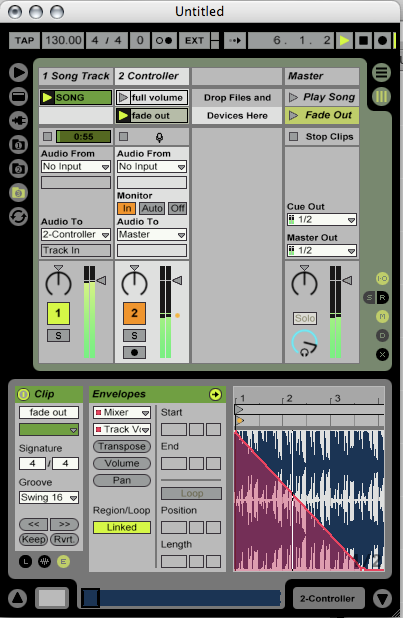
In the pic below, audio (SONG) playing on tk1 is routed through tk2. On tk2 are Dummy Clips which have volume envelopes written on them.
Triggering Scene 1 causes the SONG to play at full volume, and triggering Scene 2 causes the SONG to continue playing, but to fade-out. (See the orange dot next to tk2's VU meter, showing the fade-out in progress)
hope this helps!
Depends what you mean by a "pre-produced fade".
If you have a "controller" fade (ie a volume envelope) pre-written, you can apply that to any track, or set of tracks, at any time by using Dummy Clips.
Please have a look at this thread: http://forum.ableton.com/viewtopic.php?t=58490
In the pic below, audio (SONG) playing on tk1 is routed through tk2. On tk2 are Dummy Clips which have volume envelopes written on them.
Triggering Scene 1 causes the SONG to play at full volume, and triggering Scene 2 causes the SONG to continue playing, but to fade-out. (See the orange dot next to tk2's VU meter, showing the fade-out in progress)
hope this helps!
MBP M1Max | Sonoma 14.7 | Live 12.1 | Babyface Pro FS | Push 3T | clump of controllers
Soundcloud
Ableton Certified Trainer
Soundcloud
Ableton Certified Trainer
-
chapelier fou
- Posts: 6358
- Joined: Mon May 15, 2006 12:15 pm
-
Matthew_Nothing
- Posts: 12
- Joined: Wed Mar 15, 2006 6:08 am
I'm doing alot of this in Theatre, using Live for a sound playback device for plays, etc. I have another work around which uses the channels assigned to MIDI CC's instead of using the dummy-track method. It saves alot of screen space and I can actually get pretty complex with it. Would never think of using any other piece of software besides Ableton in a theatre again.
-
NLC Worship
- Posts: 1
- Joined: Fri Jul 24, 2015 4:37 pm
Re: fade out by scene change
This is the most helpful thing I've found yet! Thanks!!