It got so crowded on my table with 3 MIDI controllers that I didn't really have a good place for the mouse, I have been working with computers for a looong time and I have to be careful - RSI I need my mouse to be quite far away from me so my arm lies flat on the table.
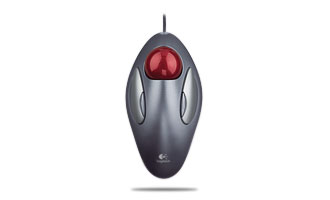
Anyhoo, I have a trackball that I use for performing live, and I decided to give that a go. I'm still a bit less precise but I know from watching people that have never used a computer before that learning to use a mouse takes prctice too. So I am hoping that I'll be as precise as my mouse in the end. It sure feel nice on my wrist and I have 2 extra buttons that can execute key comands so I've set those to pencil and open/close browser.
Which kinda kicks ass.
Using a trackball instead of a mouse!
-
liveISlife
- Posts: 2311
- Joined: Sun Aug 26, 2007 6:41 pm
- Location: Katy Perry's Cleavage, New York
- Contact:
I just found this one:
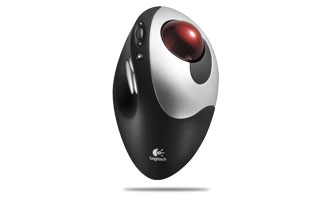
It has seven buttons total, and a scroll wheel.
The LogiTech software lets you map buttons to keystokes, also since it's wireless I can pick it up and put it on my music keyboard, so I could stop/start overdub/record using the extra buttons.... think i might have to get this.
Any users?
It has seven buttons total, and a scroll wheel.
The LogiTech software lets you map buttons to keystokes, also since it's wireless I can pick it up and put it on my music keyboard, so I could stop/start overdub/record using the extra buttons.... think i might have to get this.
Any users?
I have one of those thumb ones and I way love it.liveISlife wrote:I was actually just thinking about getting one of these(the thumb one though) because the scroll ball on my mighty mouse took a shit. I was reading how people way love them.
Only problem with mine is that every couple of months you have to take the ball out and clean off the build up of gunk on the 3 little reference balls in the cavity where the ball sits in. Just must be oil and skin flakes from my thumb that rubs off on the ball. Can't think what else it would be. Apart from that, its about 4 years old and works great. It gets heavy use but has stood up well.
iMac - 10.10.3 - Live 9 Suite - APC40 - Axiom 61 - TX81z - Firestudio Mobile - Focal Alpha 80's - Godin Session - Home made foot controller
-
liveISlife
- Posts: 2311
- Joined: Sun Aug 26, 2007 6:41 pm
- Location: Katy Perry's Cleavage, New York
- Contact:
Nice! Yeah these track balls seem like they are way better then regular mice, especially this crappy wireless mighty mouse I have. So have you ever tried the finger ball one opposed to the thumb one? The thumb one seems better because you can click and hold with your fingers while moving the ball with your thumb. I see you can also do that with using one finger to click and one to track but it seems like it would be easier/ more comfortable with the thumb. I would like to go try them out at a store but all the places here don't have them so I have to just wing it and get it onlinegjm wrote:I have one of those thumb ones and I way love it.liveISlife wrote:I was actually just thinking about getting one of these(the thumb one though) because the scroll ball on my mighty mouse took a shit. I was reading how people way love them.
Only problem with mine is that every couple of months you have to take the ball out and clean off the build up of gunk on the 3 little reference balls in the cavity where the ball sits in. Just must be oil and skin flakes from my thumb that rubs off on the ball. Can't think what else it would be. Apart from that, its about 4 years old and works great. It gets heavy use but has stood up well.

No I haven't. It doesn't seem right to me, thinking about how I do things right now. I am sure I could make it work though.liveISlife wrote: So have you ever tried the finger ball one opposed to the thumb one?
Exactly. Drag and drop works great this way.liveISlife wrote:The thumb one seems better because you can click and hold with your fingers while moving the ball with your thumb.
Mine is an old microsoft jobby. Still in great shape.
iMac - 10.10.3 - Live 9 Suite - APC40 - Axiom 61 - TX81z - Firestudio Mobile - Focal Alpha 80's - Godin Session - Home made foot controller
-
madhattared
- Posts: 308
- Joined: Tue Feb 12, 2008 1:13 am
- Location: Brooklyn

I'm still using an optical mouse from logitech w/6 buttons
I tried that new revolution one and the laser tracking is SOOO precise it's stupid.
I adjusted everything i could in the prefs. but it just didn't fit me i guess.
Those wireless trackballs are my next in line to try Look really cool if it actually works
for me....
I tried that new revolution one and the laser tracking is SOOO precise it's stupid.
I adjusted everything i could in the prefs. but it just didn't fit me i guess.
Those wireless trackballs are my next in line to try Look really cool if it actually works
for me....
MacBook Pro 2.4 Ghz 2Gb
OS X.5.7 | MOTU Ultralite | Live 8 | Ableton Drum Machine's | Addictive Drums | Conectiv+ Torq | Ms. Pinky | AudioDamage
OS X.5.7 | MOTU Ultralite | Live 8 | Ableton Drum Machine's | Addictive Drums | Conectiv+ Torq | Ms. Pinky | AudioDamage
-
oblique strategies
- Posts: 3606
- Joined: Thu Nov 02, 2006 9:57 pm
- Location: Another Green World
I have one of these: Kensington Expert Mouse. Why they didn't name it a trackball is anybody's guess... 4 buttons, scroll ring, & attachable wrist pad. Software to control multiple parameters of the trackball action let's you fine tun it to your preference. It's great!
http://us.kensington.com/html/2200.html

http://us.kensington.com/html/2200.html

-
knotkranky
- Posts: 4336
- Joined: Tue Mar 14, 2006 7:08 pm
- Location: la
-
madhattared
- Posts: 308
- Joined: Tue Feb 12, 2008 1:13 am
- Location: Brooklyn
-
oblique strategies
- Posts: 3606
- Joined: Thu Nov 02, 2006 9:57 pm
- Location: Another Green World