Looper using only Live devices

Discuss music production with Ableton Live.
Post Reply
Landwhale
Posts: 126
Joined: Sat Feb 23, 2008 5:44 pm
Contact:

Looper using only Live devices

Post by Landwhale » Fri Jan 09, 2009 6:27 am

Here's a live looper using racks of simple delays. If anyone would like to improve on it, that would be cool.

http://www.sendspace.com/file/u1wcw5

Using five computer keys or midi controllers, you can control the Loop Record Start/Erase, Overdub, and choose between 1,2,4 and 8 bars.

Everything is setup as needed, just map your computer keys or midi controller like the following picture.
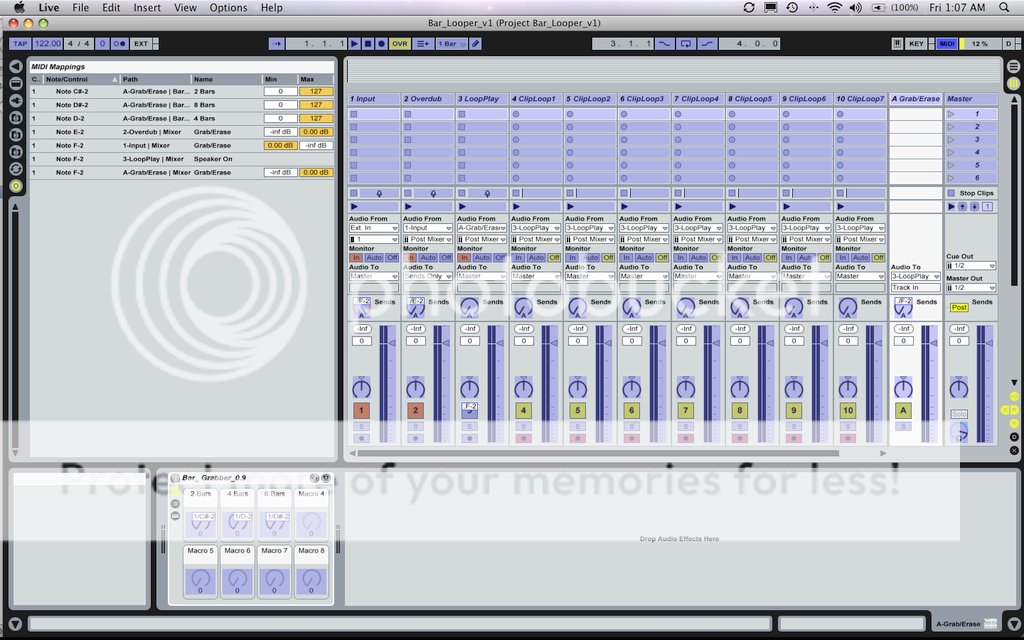
Image


If you added some dummy clips to quantize things, you could probably get even close to what you're looking for. I'm too tired to work on it more right now.

This definitely has room to be improved on, I'm sure it can be cleaned up a bit, plus the way it is midi-controlled can be changed for personal preference. Not to mention filters and such.

If anyone wants to improve on it, feel free!

(Also, I'm still on Live 6, on Leopard, so not 100% sure this will work the same in Live 5 or Live 7.)

six_o_clock_crow
Posts: 244
Joined: Sun Sep 16, 2007 7:48 pm
Location: Portsmouth: small town near Havant & Waterlooville, UK
Contact:

Post by six_o_clock_crow » Fri Jan 09, 2009 8:48 am

Thank you for this! Look forward to trying it out.

Sidenote: I trust Ableton are noting how many times 'live looping' is cropping up as a subject, and the number of workarounds people are having to find to achieve this!
HARDWARE:
Vaio laptop / M-Audio Transit / Zoom H2 /
Alesis M1 Active 520's / Sennheiser EH2200's
Behringer BCR2000 / misc. instruments & toys

SOFTWARE:
Live 7 / Sound Forge Audio Studio

chapelier fou
Posts: 6352
Joined: Mon May 15, 2006 12:15 pm

Post by chapelier fou » Fri Jan 09, 2009 10:40 am

Thank you guy! I'll take a look!
Sidenote : Hello ableton.
MacBook Pro 13" Retina i7 2.8 GHz OS 10.13, L10.0.1, M4L.
MacStudio M1Max 32Go OS 12.3.1

six_o_clock_crow
Posts: 244
Joined: Sun Sep 16, 2007 7:48 pm
Location: Portsmouth: small town near Havant & Waterlooville, UK
Contact:

Post by six_o_clock_crow » Fri Jan 09, 2009 11:27 am

chapelier fou wrote:Sidenote : Hello ableton.
:lol:

Looking at this screenshot, the more I think about it, I reckon the ultimate solution should be (in a future Live update) a 'Looper Rack.' Here's some random ideas...

A Looper Rack would be similar to a drum rack layout, with every 'pass' you record into the rack occupying a slot/cell. You could set up a chain, like you can with FX and instrument racks, to morph between the layers of sound in a Looper Rack.

With each pass held in a cell or rack chain slot, you could adjust levels/pans from the rack, without having to take up loads of screen space with lots of seperate channels for each layer (or you could have the rack 'unfold' like drum racks do, I guess.)

Each 'pass' could be recorded into an instance of Simpler and you could apply envelopes/filters etc (like the Crossfade Looper plug-in) to each layer of your loop.

You'd then get the sound-on-sound looping concept, plus the flexibility of processing layers individually.

There should probably be a 'render' feature, to capture the output of the Looper Rack as a new clip, freeing up resources. A bit like the Electro Harmonix 2880 Looper mixdown feature. I know you could do this through resampling (which is how I achieve this now) but it would be good to have this built into the Looper Rack device.

Plus, of course, the Looper Rack can have macro controls, and other nifty stuff built in. Basically, taking all the best ideas from hardware loopers and 'borrowing' them :D

Or maybe I just need to get into Max/MSP??? :roll:
HARDWARE:
Vaio laptop / M-Audio Transit / Zoom H2 /
Alesis M1 Active 520's / Sennheiser EH2200's
Behringer BCR2000 / misc. instruments & toys

SOFTWARE:
Live 7 / Sound Forge Audio Studio

Landwhale
Posts: 126
Joined: Sat Feb 23, 2008 5:44 pm
Contact:

Post by Landwhale » Fri Jan 09, 2009 12:58 pm

I agree. I really hope there's a dedicated loop plugin in 8.

Jekblad
Posts: 2353
Joined: Tue May 13, 2008 2:02 am
Contact:

Post by Jekblad » Fri Jan 09, 2009 1:21 pm

six_o_clock_crow wrote: Looking at this screenshot, the more I think about it, I reckon the ultimate solution should be (in a future Live update) a 'Looper Rack.' Here's some random ideas...

A Looper Rack would be similar to a drum rack layout, with every 'pass' you record into the rack occupying a slot/cell. You could set up a chain, like you can with FX and instrument racks, to morph between the layers of sound in a Looper Rack.

With each pass held in a cell or rack chain slot, you could adjust levels/pans from the rack, without having to take up loads of screen space with lots of seperate channels for each layer (or you could have the rack 'unfold' like drum racks do, I guess.)

Each 'pass' could be recorded into an instance of Simpler and you could apply envelopes/filters etc (like the Crossfade Looper plug-in) to each layer of your loop.

You'd then get the sound-on-sound looping concept, plus the flexibility of processing layers individually.
:roll:
this is excellent thinking my friend! Well done for random
2.4 ghz Macbook Pro 8gb RAM, SSD, Live 9 Suite, Puremagnetik, Minimal Talent

bencodec
Posts: 330
Joined: Fri Jun 11, 2004 5:14 pm
Location: Brooklyn

Post by bencodec » Fri Jan 09, 2009 2:56 pm

I'm sure they have not forgotten about us live loopers... it's just that live looping is tricky, we all have our own ways we like to do things and until thy managed to come up with an elegant way to support all our different workflows i think we'll have to wait.

the wait is worth it if they nail it in the end.
Macbook Pro unibody 2.2 Ghz Quad i7, 16GB RAM, 512MB graphics, 500 GB SSD, 500 GB HD, Mac OS 10.8
http://www.bangbang-nyc.com

Landwhale
Posts: 126
Joined: Sat Feb 23, 2008 5:44 pm
Contact:

Post by Landwhale » Fri Jan 09, 2009 3:59 pm

Anyone have any feedback on this looping setup?

six_o_clock_crow
Posts: 244
Joined: Sun Sep 16, 2007 7:48 pm
Location: Portsmouth: small town near Havant & Waterlooville, UK
Contact:

Post by six_o_clock_crow » Fri Jan 09, 2009 4:12 pm

bencodec wrote:I'm sure they have not forgotten about us live loopers... it's just that live looping is tricky, we all have our own ways we like to do things and until thy managed to come up with an elegant way to support all our different workflows i think we'll have to wait.

the wait is worth it if they nail it in the end.
Agreed. Although, I think everyone who wants better live looping functions would agree that a start in this area would be the ability to overdub into session clips? I hesitate to say this as I am not a programmer, but would this really be too hard to implement?
HARDWARE:
Vaio laptop / M-Audio Transit / Zoom H2 /
Alesis M1 Active 520's / Sennheiser EH2200's
Behringer BCR2000 / misc. instruments & toys

SOFTWARE:
Live 7 / Sound Forge Audio Studio

chapelier fou
Posts: 6352
Joined: Mon May 15, 2006 12:15 pm

Post by chapelier fou » Fri Jan 09, 2009 4:13 pm

Not tried yet. I have been mixing and mixing...
MacBook Pro 13" Retina i7 2.8 GHz OS 10.13, L10.0.1, M4L.
MacStudio M1Max 32Go OS 12.3.1

Landwhale
Posts: 126
Joined: Sat Feb 23, 2008 5:44 pm
Contact:

Post by Landwhale » Fri Jan 09, 2009 4:18 pm

Funny thing, I haven't had much time to try it either. I tested it while I was making it last night, but haven't been able to sneak in some play time at work, haha.

Landwhale
Posts: 126
Joined: Sat Feb 23, 2008 5:44 pm
Contact:

Post by Landwhale » Fri Jan 09, 2009 5:48 pm

six_o_clock_crow, The set I posted can do what you're saying about recording to separate clips as well, that's what the "ClipLoop" tracks are for. They are setup to record the output of "LoopPlay", so you can record to a clip at any point you'd like, then manipulate the clip.

Post Reply