hi everybody,
guess i once mentioned it before but plz have a look at my software for putting korg's padkontrol into native mode. the functionality has invreased since last time and i think there are some quite interesting features. please let me know if you like it.
http://www.doktor-andy.de/joomla15/inde ... Itemid=126
PadKontrol + Native mode
PadKontrol + Native mode
If you cannot open it you don't own it
Re: PadKontrol + Native mode
I'm looking to use the 2 buttons 'Knob Assign 1 and Knob assign 2'. I just want to map them to the metronome and overdub buttons. Can I do that with this software?
If I use native mode, will I still have correct use of drum racks? Using the mouse to scroll up the drum rack to a different section of samples and still being in the correct place on the controller?
If I use native mode, will I still have correct use of drum racks? Using the mouse to scroll up the drum rack to a different section of samples and still being in the correct place on the controller?
Re: PadKontrol + Native mode
the behaviour of the knob assign buttos can be configured in the settings.
you can use them to toggle or flash things if you want to.
the knobs next to those buttons send midi notes/CCs with incresing/decreasing velocity and an extra note at the lower/ upper end. that way you can control your metronome with the button and your cue volume with the knob next to it.
('assign buttons are toggled' in the lower part).
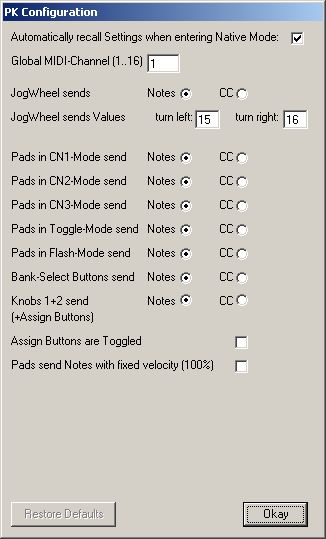
when in native mode the pads keep on sending notes like in operation mode. you can configure if you want them to send with a fixed velocity or dynamically
b.t.w.:
at the moment the jogwheel send note/cc impulses with every click
this could be used for scrolling.
i think about adding the functionality of controlling one note's velocity with it as a selectable feature.
you can use them to toggle or flash things if you want to.
the knobs next to those buttons send midi notes/CCs with incresing/decreasing velocity and an extra note at the lower/ upper end. that way you can control your metronome with the button and your cue volume with the knob next to it.
('assign buttons are toggled' in the lower part).
when in native mode the pads keep on sending notes like in operation mode. you can configure if you want them to send with a fixed velocity or dynamically
b.t.w.:
at the moment the jogwheel send note/cc impulses with every click
this could be used for scrolling.
i think about adding the functionality of controlling one note's velocity with it as a selectable feature.
If you cannot open it you don't own it
Re: PadKontrol + Native mode
Thanks for the reply =)
Is it possible to change position of the black box on a drum rack with the 'Setting Section' jog wheel?
Is it possible to change position of the black box on a drum rack with the 'Setting Section' jog wheel?
Re: PadKontrol + Native mode
not sure...
how would you do that with any midi controller?
the problem from my point of view is that you would have to assign the midi-notes to the drum samples dynamically within ableton first.
is that possible? i don't know.
[edit] you could take a bunch of 'pitch' midi effects, maybe group them in a rack and activate single instances of them accroding to incoming midi data. that way you could access more drum samples with just 16 pads but this might be a little tricky and has to be done in ableton.
plz keep in mind that you have instant access to three banks of pads (48 pads) with different midi values when you use my software. maybe this could already be enough... just have a look at the midi sheet on the website. it states it very clearly.
how would you do that with any midi controller?
the problem from my point of view is that you would have to assign the midi-notes to the drum samples dynamically within ableton first.
is that possible? i don't know.
[edit] you could take a bunch of 'pitch' midi effects, maybe group them in a rack and activate single instances of them accroding to incoming midi data. that way you could access more drum samples with just 16 pads but this might be a little tricky and has to be done in ableton.
plz keep in mind that you have instant access to three banks of pads (48 pads) with different midi values when you use my software. maybe this could already be enough... just have a look at the midi sheet on the website. it states it very clearly.
Last edited by Andymann on Tue May 03, 2011 8:51 am, edited 1 time in total.
If you cannot open it you don't own it
Re: PadKontrol + Native mode
I have not been able to do it with a midi controller.
I usually have to select it with the mouse and use the keyboard up/down arrow keys to select the area
I usually have to select it with the mouse and use the keyboard up/down arrow keys to select the area
Re: PadKontrol + Native mode
just edited my post above...
and here's the midi sheet:
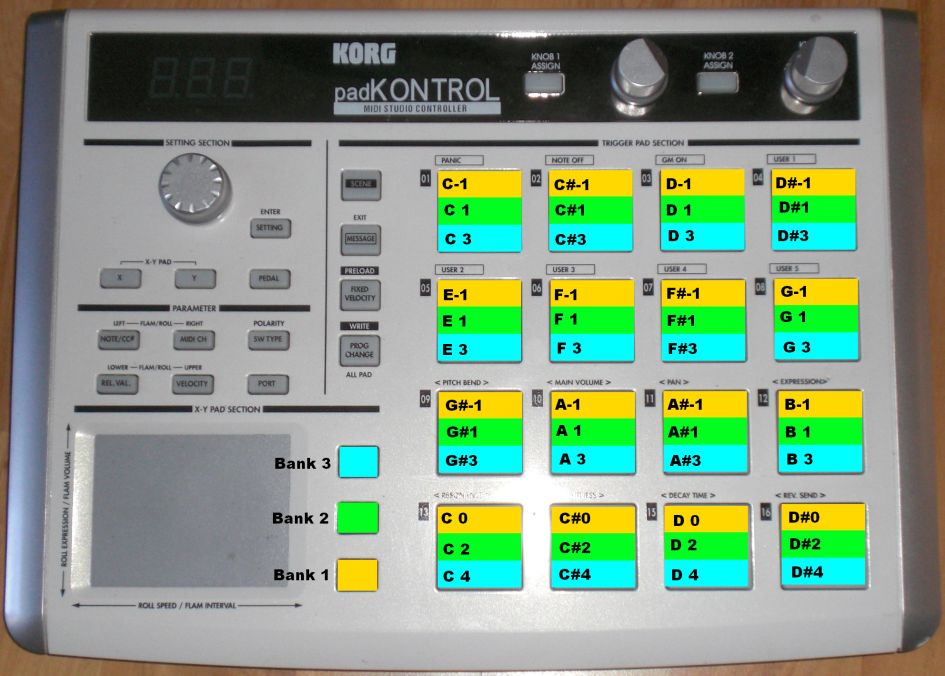
and here's the midi sheet:
If you cannot open it you don't own it
Re: PadKontrol + Native mode
I understand a bit more now - you could use the 3 bank options to access 3 different sections of the drum rack, that would be pretty quick as well I think =)
Re: PadKontrol + Native mode
just played arround with ableton a little bit.
maybe this one is another solution:
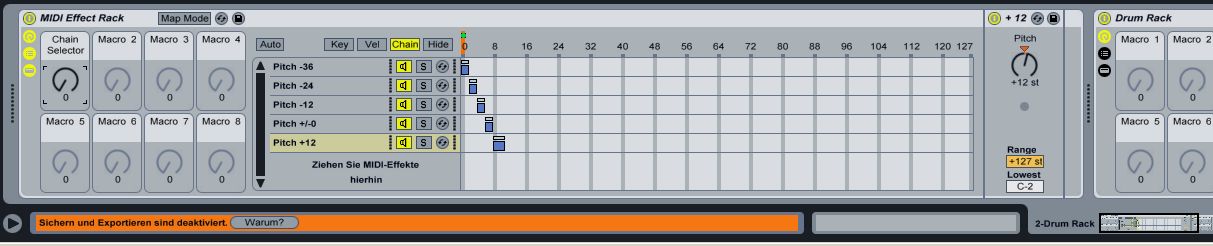
it might a little bit of tweaking but the approach can't be that wrong....
the chain selector is controlled by the first makro knob.
that knob could be midimapped to ...something....
according to the active pitch effect the incoming midi notes are transposed to different octaves.
that way you can access different octaves in one instance of drumrack with any controller
btw:
my software also sends a midi note upon switching banks. that way you could not only access different octaves within one instance of drumrack but also use the changing of banks to trigger other stuff (fx, enable stuff, ....)
maybe this one is another solution:
it might a little bit of tweaking but the approach can't be that wrong....
the chain selector is controlled by the first makro knob.
that knob could be midimapped to ...something....
according to the active pitch effect the incoming midi notes are transposed to different octaves.
that way you can access different octaves in one instance of drumrack with any controller
btw:
my software also sends a midi note upon switching banks. that way you could not only access different octaves within one instance of drumrack but also use the changing of banks to trigger other stuff (fx, enable stuff, ....)
If you cannot open it you don't own it
-
mr.ergonomics
- Posts: 919
- Joined: Thu Nov 08, 2007 3:12 am
Re: PadKontrol + Native mode
web space doesn't work here. but it looks very interesting