Learn about building and using Max for Live devices.
-
stringtapper
- Posts: 6321
- Joined: Sat Aug 28, 2004 6:21 pm
Post
by stringtapper » Thu Jul 21, 2011 12:24 am
I've just uploaded my algorithmic polyphonic synth Algae to maxforlive.com:
http://www.maxforlive.com/library/device.php?id=727

Algae is a 4-oscillator polyphonic synth that allows the user to create complex polyphonic textures by defining an algorithm for each voice that controls various aspects of pitch and rhythm.
Enjoy and please let me know if there are problems or if you have suggestions for improvements.
Unsound Designer
-
broc
- Posts: 1151
- Joined: Mon Jul 26, 2004 8:37 am
Post
by broc » Thu Jul 21, 2011 9:15 am
Very nice design and powerful content. Thanks for sharing!
I've experimented a bit and everything seems to work perfectly.
Maybe you could also make a stripped-down version with MIDI output?
It would be monophonic only since M4L devices don't support multi-channel MIDI output.
But for polyphony one could simply load multiple devices on different tracks.
-
stringtapper
- Posts: 6321
- Joined: Sat Aug 28, 2004 6:21 pm
Post
by stringtapper » Thu Jul 21, 2011 1:30 pm
broc wrote:Very nice design and powerful content. Thanks for sharing!
I've experimented a bit and everything seems to work perfectly.
Maybe you could also make a stripped-down version with MIDI output?
It would be monophonic only since M4L devices don't support multi-channel MIDI output.
But for polyphony one could simply load multiple devices on different tracks.
Thanks broc! Glad you like it.
I've already got a monophonic MIDI version that I made early on in the process of developing Algae. I just need to update the engine and clean it up and will post that too.
Any thoughts on ways to make the synthesis engine a bit more robust are welcome.

Unsound Designer
-
broc
- Posts: 1151
- Joined: Mon Jul 26, 2004 8:37 am
Post
by broc » Thu Jul 21, 2011 3:50 pm
stringtapper wrote:Any thoughts on ways to make the synthesis engine a bit more roust are welcome.
Adding a simple filter with cutoff envelope may help to get more expressive sounds.
-
rawore
- Posts: 60
- Joined: Wed Apr 29, 2009 4:24 pm
Post
by rawore » Thu Jul 21, 2011 10:29 pm
no sound upon dropping it into a new column. midi shows on device display. live 8.2.2 max latest.
just downloaded from max4live.com
windows 7.
ok, right... needs the clock to run.
-
stringtapper
- Posts: 6321
- Joined: Sat Aug 28, 2004 6:21 pm
Post
by stringtapper » Thu Jul 21, 2011 11:00 pm
Yeah Live's transport has to be running for Algae to run.
So did you get it running?
I will get some better documentation typed up for an update. I just wanted to get it out there because I've been sitting on it for a while.
Unsound Designer
-
zigzag
- Posts: 155
- Joined: Wed Mar 19, 2008 6:29 pm
Post
by zigzag » Fri Jul 22, 2011 5:25 pm
that is so sweet. many many thanks!
-
Liam
- Posts: 708
- Joined: Sun Jul 18, 2004 3:18 pm
- Location: Northern CA, USA
Post
by Liam » Fri Jul 22, 2011 9:47 pm
No sound from Algae
PC, Win7, 32
Engine running
Placed on midi track
What Inputs are required if any? A midi clip on the track itself? Another midi track?
-
stringtapper
- Posts: 6321
- Joined: Sat Aug 28, 2004 6:21 pm
Post
by stringtapper » Sat Jul 23, 2011 1:44 am
Hmm, you should get sound simply from the transport running as long as you don't have the buttons labeled "MIDI" at the end of each voice engaged. These enable midi input instead of algorithmic input on the voice.
Unsound Designer
-
stringtapper
- Posts: 6321
- Joined: Sat Aug 28, 2004 6:21 pm
Post
by stringtapper » Sat Jul 23, 2011 3:04 pm
Ok I've also uploaded Algae MIDI, the midi version of Algae without the synth.
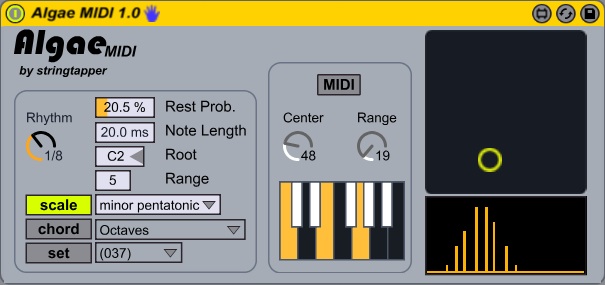
Note that there's an issue where MIDI mode will continuously send out the note C2 when it's not getting any input. I had a fix for that in the synth but it doesn't work in the midi device, so I'm looking at that.
http://www.maxforlive.com/library/device.php?id=738Unsound Designer
-
Liam
- Posts: 708
- Joined: Sun Jul 18, 2004 3:18 pm
- Location: Northern CA, USA
Post
by Liam » Sat Jul 23, 2011 3:24 pm
stringtapper wrote:Hmm, you should get sound simply from the transport running as long as you don't have the buttons labeled "MIDI" at the end of each voice engaged. These enable midi input instead of algorithmic input on the voice.
Ran it without the midi button enabled originally. I just used the other default options.
Still no luck with hearing any sound.
-
stringtapper
- Posts: 6321
- Joined: Sat Aug 28, 2004 6:21 pm
Post
by stringtapper » Sat Jul 23, 2011 3:31 pm
@Liam:
This may have something to do with the waveform files, which are .aif and being on Windows you may have .wav versions installed. Could you confirm for me whether you have a file named "M4L.sine.wav" installed (or on the off chance a file named "M4L.sine.aif")?
Unsound Designer
-
Liam
- Posts: 708
- Joined: Sun Jul 18, 2004 3:18 pm
- Location: Northern CA, USA
Post
by Liam » Sat Jul 23, 2011 4:05 pm
stringtapper wrote:@Liam:
This may have something to do with the waveform files, which are .aif and being on Windows you may have .wav versions installed. Could you confirm for me whether you have a file named "M4L.sine.wav" installed (or on the off chance a file named "M4L.sine.aif")?
Where would the file be installed? I can do a Search but that could take some time.
Does the graphic (on the left above the Master Level) have any actual function? (Numbers appear when hovering over that graphic area).
-
Liam
- Posts: 708
- Joined: Sun Jul 18, 2004 3:18 pm
- Location: Northern CA, USA
Post
by Liam » Sat Jul 23, 2011 4:10 pm
stringtapper wrote:@Liam:
This may have something to do with the waveform files, which are .aif and being on Windows you may have .wav versions installed. Could you confirm for me whether you have a file named "M4L.sine.wav" installed (or on the off chance a file named "M4L.sine.aif")?
According to M4L (the editor) the files are not loaded. Or can't be found.
-
Liam
- Posts: 708
- Joined: Sun Jul 18, 2004 3:18 pm
- Location: Northern CA, USA
Post
by Liam » Sat Jul 23, 2011 4:13 pm
stringtapper wrote:@Liam:
This may have something to do with the waveform files, which are .aif and being on Windows you may have .wav versions installed. Could you confirm for me whether you have a file named "M4L.sine.wav" installed (or on the off chance a file named "M4L.sine.aif")?
Sorry, I'm now updating to Live 8.2.2 - something I ought to have done first.
That may help with this snag?