Hi all,
I´m looking for a way to skip through the pads of a drum rack with a MIDI-Controller
(AKAI MPD32). My idea is to change the samples in Pad View with the
[<] and [>] buttons or a knob so that I can play all 128 pads.
Using the PAD BANK buttons would just give me access to 64 samples/pads.
As far as I know there is no way to MIDI-map the view selector(those tiny squares to the right
of the Pad view), or is this possible?
If not, are there any alternatives I could try to solve this problem?
Thanks in advance
Vertecs
Skip through drum rack with a MIDI-Controller
-
florian_bl
- Posts: 92
- Joined: Wed Oct 12, 2011 3:53 pm
- Location: Austria
Re: Skip through drum rack with a MIDI-Controller
If you put "Pitch" from the MIDI Effects folder in front of the drum rack you have an assignable knob to go through your sounds. Does this solve your problem? Or does it mess up something else in your setup at the same time?
-
JuanSOLO
- Posts: 3236
- Joined: Sun Jul 15, 2007 8:21 am
- Location: Shreveport LA, sometimes Dallas/Ft Worth TX
Re: Skip through drum rack with a MIDI-Controller
You CAN midi map to title bars bringing things into focus.
Have a look at this thread, you can probably get a few ideas from it.
viewtopic.php?f=1&t=179672
Have a look at this thread, you can probably get a few ideas from it.
viewtopic.php?f=1&t=179672
Re: Skip through drum rack with a MIDI-Controller
Maybe I explained it not good enough.
Let´s try this again.
Look at list image:
http://yfrog.com/ki5zmrp
Usually you have to click on the tiny
grey square next to the pads to change the cell focus
or to be able to do this with the up/down keys or ALT+up/ALT+down.
Just getting the rack into focus doesnt help.
So how do I move the black rectangle up and down with my MPD32?
Anything is wellcome:
- Mapping
- Remote sxript
- Max4LIVE....
Let´s try this again.
Look at list image:
http://yfrog.com/ki5zmrp
Usually you have to click on the tiny
grey square next to the pads to change the cell focus
or to be able to do this with the up/down keys or ALT+up/ALT+down.
Just getting the rack into focus doesnt help.
So how do I move the black rectangle up and down with my MPD32?
Anything is wellcome:
- Mapping
- Remote sxript
- Max4LIVE....
-
JuanSOLO
- Posts: 3236
- Joined: Sun Jul 15, 2007 8:21 am
- Location: Shreveport LA, sometimes Dallas/Ft Worth TX
Re: Skip through drum rack with a MIDI-Controller
I'm not 100% about this, but I dont think you can.
There are scripts, and ways to change which cells are getting triggered, but I think the only way to scroll is with a mouse.
OR at least the only way to get the black square is to click on it.
You can create mouse gestures in M4L
Key strokes is a little hard to come by in M4L
Bomes handles key strokes really well.
But all that seems like a lot of stuff just to get the black box to scroll?
Do any of the remotescripts for the NanoKontrol affect drumRacks in this way? Might want to look into that.
There are scripts, and ways to change which cells are getting triggered, but I think the only way to scroll is with a mouse.
OR at least the only way to get the black square is to click on it.
You can create mouse gestures in M4L
Key strokes is a little hard to come by in M4L
Bomes handles key strokes really well.
But all that seems like a lot of stuff just to get the black box to scroll?
Do any of the remotescripts for the NanoKontrol affect drumRacks in this way? Might want to look into that.
Re: Skip through drum rack with a MIDI-Controller
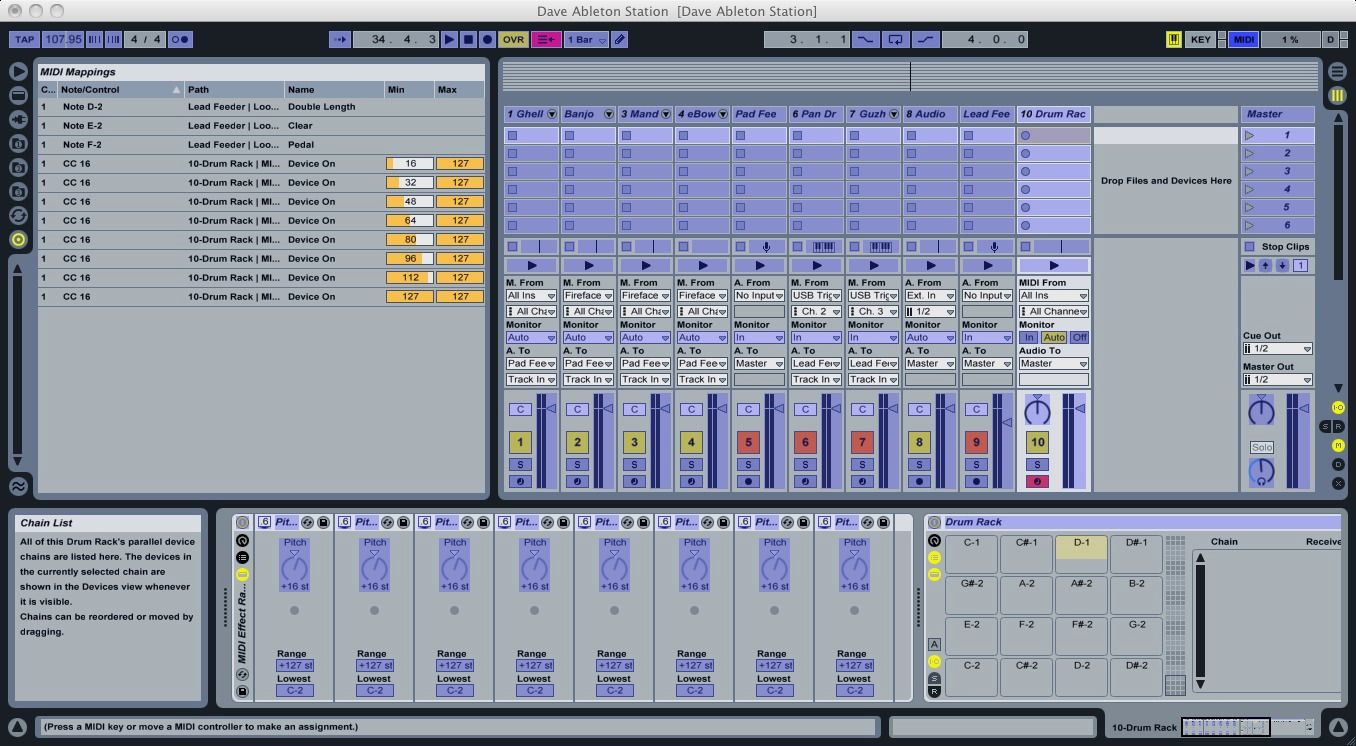
I've come up with a relatively primitive way to do this. I created a chain 8 of "pitch" midi plugins, each set at +16 steps. I then mapped a single midi CC from my trigger finger to the "device on" button of each of the devices, but set different ranges for the "on" signal, in steps of 16 (see picture below). Now when I adjust the CC slider on my trigger finger, the incoming midi signal to the drum rack gets pitch shifted up in increments of 16 steps, thus allowing me full range of the drum rack. Again, there's probably a better way to do this, but hey, it works!