I just purchased a used Tascam US2400 USB 24ch. mixer control surface. I am hoping to find one or two others who've made it work for them within Live. I have some questions:
1- When first configuring the Tascam, I am suppose to chose between 5 different control surface modes. Which works best for those working with Ableton? (1- Mackie HUI, 2- Sonar, 3- Digital Performer, 4- Logic or 5 - 'Native')?
2- Once I launch Ableton, navigate to preferences and select the MIDI page, which control surface is recommended? At first glance I would think any one of the three MackieControl, MackieControlXT or MackieControl Classic, however the drop down window offers around 30 different controllers (just NOT the Tascam!). Any tips here would be appreciated.
3- It looks like I need to select 4 control surfaces for this one mixer in Ableton's MIDI preferences and then select the four different MIDI ins & outs. Any tips here?
4- The options below on the Ableton MIDI page show all the Tascam Midi inputs with the 3 options: track/sync/remote. Any recommendations here would be ever so appreciated.
Tascam US2400 Mixer - setup & configure with Ableton Live
Re: Tascam US2400 Mixer - setup & configure with Ableton Live
I use Aux2 with Ableton8 and Ableton9 but I'm still investigating other Aux options with Ableton9. Unfortunately something changed in Ableton9 and I lost all functionality for channels 09-24 except for sliders.sadkin wrote:1- When first configuring the Tascam, I am suppose to chose between 5 different control surface modes. Which works best for those working with Ableton? (1- Mackie HUI, 2- Sonar, 3- Digital Performer, 4- Logic or 5 - 'Native')?
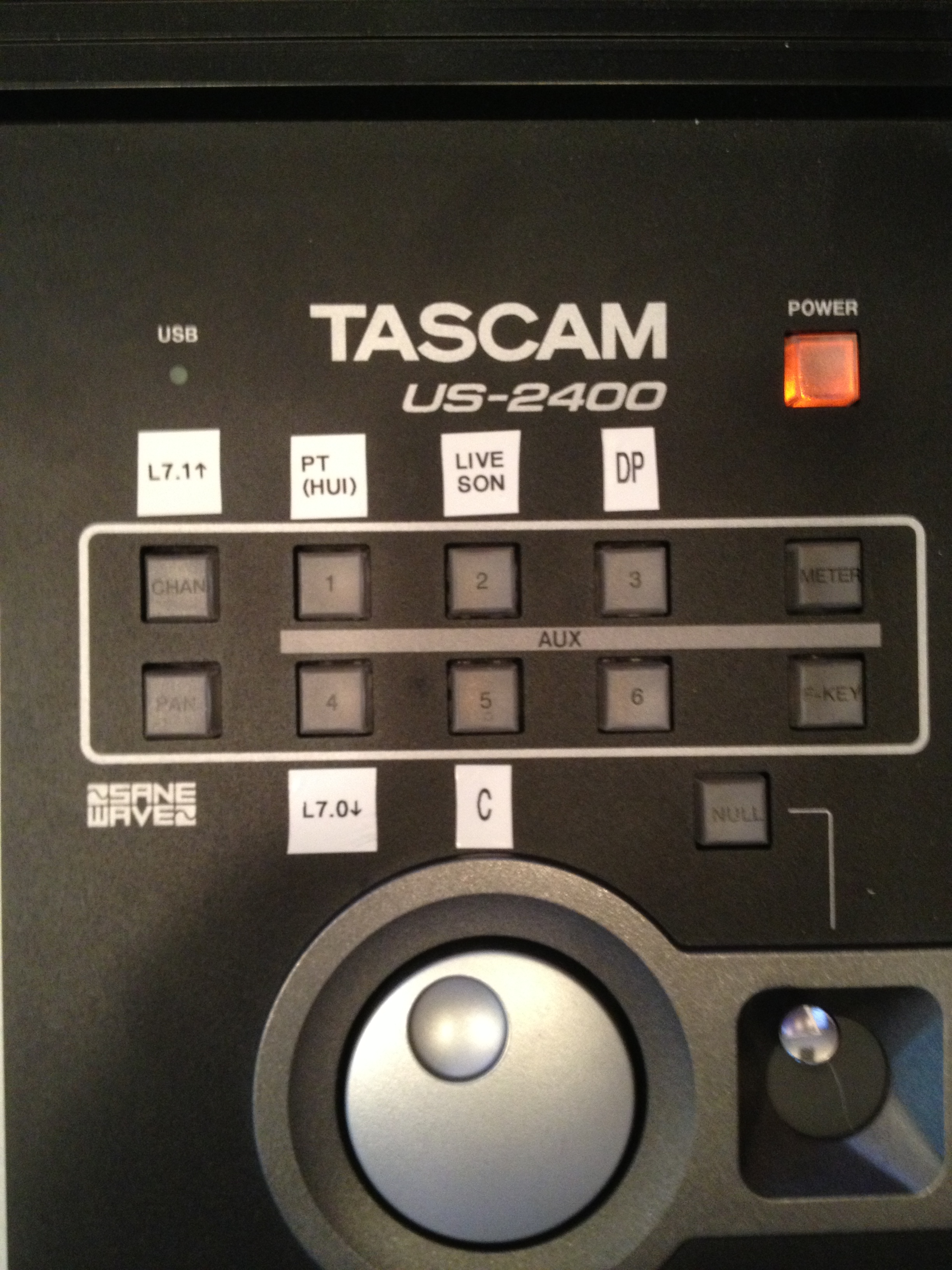
I use firmware v1.31. I've labeled the Aux's as:
Chan=Logic 7.1 and up
Aux01=Pro Tools (HUI Mode)
Aux02=Ableton Live/Sonar (Mackie Mode)
Aux03=Ableton Live/Sonar (Mackie Mode)
Pan=User Mode
Aux04=Logic 7.0 and earlier
Aux05=Cubase/Nuendo
Aux06=Future Use
Here's a pic: http://www.moontechstudios.com/img/tasc ... labels.jpg
I use:sadkin wrote:2- Once I launch Ableton, navigate to preferences and select the MIDI page, which control surface is recommended? At first glance I would think any one of the three MackieControl, MackieControlXT or MackieControl Classic, however the drop down window offers around 30 different controllers (just NOT the Tascam!). Any tips here would be appreciated.
MackieControl for Port01
MackieControlXT for Port02
MackieControlXT for Port03
Here's a pic:
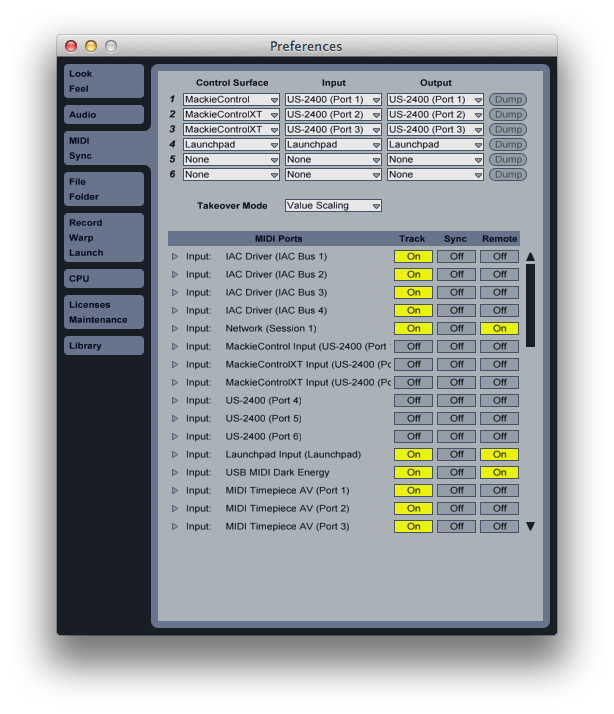
No need to use Port04 of the US-2400 in Ableton. Port04 is only for the Surround Joystick which Ableton doesn't utilize. All transport controls and scrub are assigned to Port01sadkin wrote:3- It looks like I need to select 4 control surfaces for this one mixer in Ableton's MIDI preferences and then select the four different MIDI ins & outs. Any tips here?
Once you assign Ports01-03 to Mackie Control they will no longer appear in the MIDI Ports list, although Ports04-06 will. Ports04-06 should be set to Off for Track/Sync/Remotesadkin wrote:4- The options below on the Ableton MIDI page show all the Tascam Midi inputs with the 3 options: track/sync/remote. Any recommendations here would be ever so appreciated.
As for Ableton9, like I mentioned above, something changed in the their controller code basically causing channels 09-24 to be useless. I'm in the process of looking for a MIDI Remote Script for the US-2400. If I'm unable to find one, I'll code one and post a link here.
Hope this helps,
k