redoak wrote:Thanks for the reply chrk!
However, I'm still getting some of the cue audio coming through to the master at a very low volume, even with the activator switch off. Is this normal?
Not at all. I've just tested, if there might be something leaking from the sends/returns (in Live click S and R next to the master fader to view them). But that can't be, no matter if I set a return to post or pre, it recieves no signal from a deactivated track.
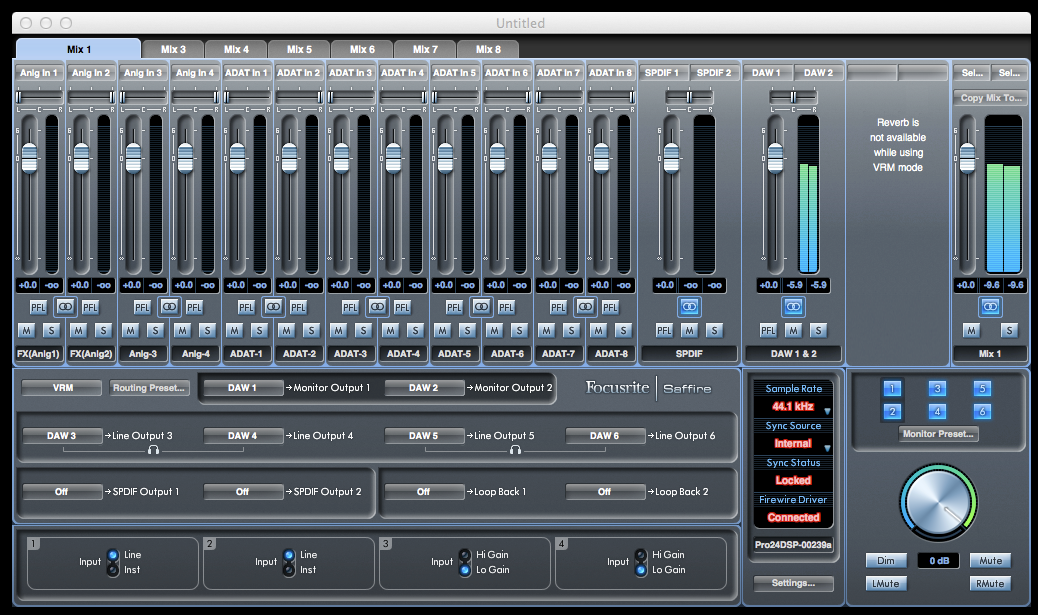
Your Mix Control screenshot puzzles me, though: You haven't selected any output for the master fader of your Mix 1. So it is recieving any signal that is pulled up in the mix, it shows levels according to its fader position, but you're actually not HEARING the signal from that mix.
I guess you have never ever looked at the other mix tabs, so they may all be set up to use "Many outputs", even all available outs (they're mono, so perpaps one of each), and that's what you're really listening to.
Get to grips with the Mix Control, it's a poweful tool for monitoring.
Set up your input tracks as you need them, e.g. stereo-link two unused ADAT ins to listen to DAW 3&4 and another two for DAW 5&5.
Stereo-Link Mix 3 and 4, 5 and 6, dedicate Mix 1 to your Mon 1 and Mon 2, Mix 3 to Line Out 3 and 4, Mix 5 to Line Out 5 and 6. Mix 3 will then controll the first headphone output, Mix 5 the second headphone output as well. This is by design, see the headphone symbols in the router section.
As you're not going to be using Mixes 7 and 8, pull down all the input faders and switch the outputs to None.
Now you have one mix pair corresponding to each physical output pair and can mix the DAW signal on each according to your needs.