Hey,
when I just want to play around with Push and search some sounds, there are are 90% sounds in my Folders that I would never use.
Is there a way to delete sounds?
One time I tried it to delete them out of the windows explorer, but after that even the sounds I didn't deleted werend playable anymore...
Sound Management / Delete Sounds?
Re: Sound Management / Delete Sounds?
Does nobody has a similar problem?
How do you manage your sound library?
How do you manage your sound library?
Re: Sound Management / Delete Sounds?
you can sort ur sounds by rank (times u use them). I would never delete any sample/sound i have.
 Okay, I am a sample messie...
Okay, I am a sample messie...Re: Sound Management / Delete Sounds?
How do you you can sort ur sounds by rank ?
I would also be able to ged rid of the 90% trash which comes with live and rather find my own sounds!
I would also be able to ged rid of the 90% trash which comes with live and rather find my own sounds!
Re: Sound Management / Delete Sounds?
just lcik onto te rank in the browser (like it is possible in windows) if u dont see it, just right click and add them.
Here is a pick (where Name and Place stands u can also have rank)
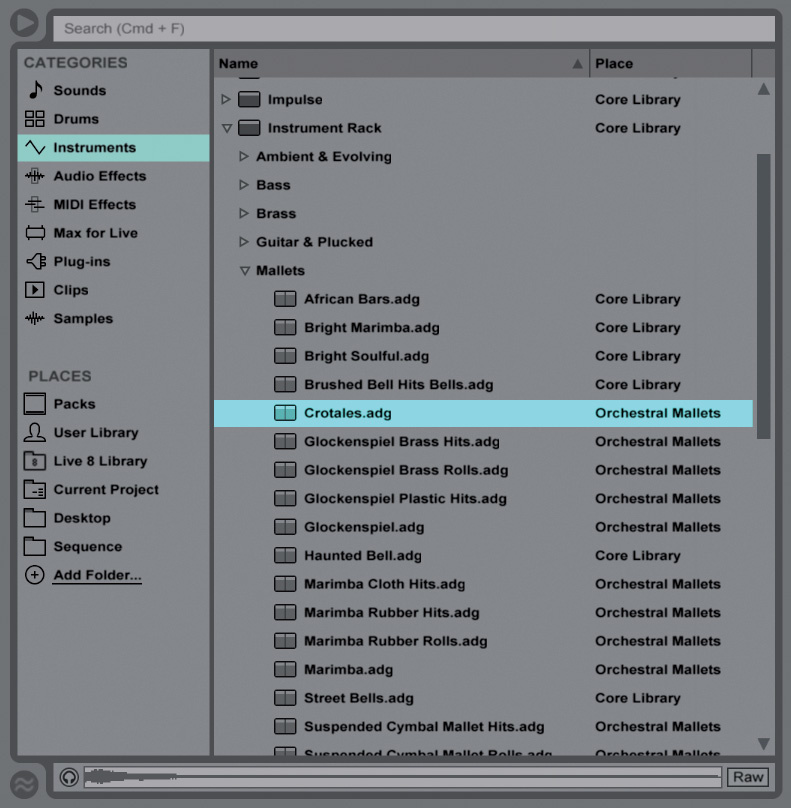
Here is a pick (where Name and Place stands u can also have rank)
Re: Sound Management / Delete Sounds?
Hm i dont get it.
What exactly do you mean by rank, please?
What exactly do you mean by rank, please?
Re: Sound Management / Delete Sounds?
Ahh i see:
https://www.dropbox.com/s/agilrvjbe8n3c ... 8.png?dl=0
Interesting, but how does that help you organise samples?
It would be lovely if you could mark certain sounds as trash so that they just get hide
https://www.dropbox.com/s/agilrvjbe8n3c ... 8.png?dl=0

Interesting, but how does that help you organise samples?
It would be lovely if you could mark certain sounds as trash so that they just get hide
-
störgeräusche
- Posts: 325
- Joined: Thu May 08, 2008 9:04 pm
- Contact:
Re: Sound Management / Delete Sounds?
a possible workaround for you is this hack:
http://audiomodder.com/blogs/news/89765 ... accessible
doing this, places will be the 4th entry in your push browser. You still have all the garbage but it's not in the way all the time.
Organize your Places by dragging the folders you use on a daily basis and you should be set.
http://audiomodder.com/blogs/news/89765 ... accessible
doing this, places will be the 4th entry in your push browser. You still have all the garbage but it's not in the way all the time.
Organize your Places by dragging the folders you use on a daily basis and you should be set.
soundcloud
website
______________________________________________________
Win7 Pro 64 - i7 870 @ 2.93 GHz - 16 GB RAM - RME Multiface II
Live Suite 9 - Komplete 9 - Waldorf Largo & Edition - Elektron Analog Rytm - Push 1&2- Launch Control & XL -
Adam P33A
website
______________________________________________________
Win7 Pro 64 - i7 870 @ 2.93 GHz - 16 GB RAM - RME Multiface II
Live Suite 9 - Komplete 9 - Waldorf Largo & Edition - Elektron Analog Rytm - Push 1&2- Launch Control & XL -
Adam P33A
Re: Sound Management / Delete Sounds?
File -> Manage Files
Re: Sound Management / Delete Sounds?
Cause the more often you use the sounds the more they are at the top. So the unused ones are some kind of hided.ansolas wrote: Interesting, but how does that help you organise samples?
Re: Sound Management / Delete Sounds?
How does that help ? Currently I use that for consolidating and editing samples onlycotdagoo wrote:File -> Manage Files
Last edited by ansolas on Wed Oct 15, 2014 2:03 pm, edited 2 times in total.
Re: Sound Management / Delete Sounds?
Thank you, nice one.störgeräusche wrote:a possible workaround for you is this hack:
http://audiomodder.com/blogs/news/89765 ... accessible
doing this, places will be the 4th entry in your push browser. You still have all the garbage but it's not in the way all the time.
Organize your Places by dragging the folders you use on a daily basis and you should be set.
I am already using Places but it would be lovely to be able to use the Category Drum Filter only for my presets and sounds.
-
störgeräusche
- Posts: 325
- Joined: Thu May 08, 2008 9:04 pm
- Contact:
Re: Sound Management / Delete Sounds?
I was looking at this:
http://jointhestudio.com/blog/2013/04/1 ... -dj-limbs/
but I am not sure it works in 9.1.5, and having an upcoming live gig I don't feel like experimenting with this.
I'll look into this after the gig. Maybe by deleting the ableton stock sample's path and preparing my own folder structure could work... this way only my samples would be shown.
http://jointhestudio.com/blog/2013/04/1 ... -dj-limbs/
but I am not sure it works in 9.1.5, and having an upcoming live gig I don't feel like experimenting with this.
I'll look into this after the gig. Maybe by deleting the ableton stock sample's path and preparing my own folder structure could work... this way only my samples would be shown.
soundcloud
website
______________________________________________________
Win7 Pro 64 - i7 870 @ 2.93 GHz - 16 GB RAM - RME Multiface II
Live Suite 9 - Komplete 9 - Waldorf Largo & Edition - Elektron Analog Rytm - Push 1&2- Launch Control & XL -
Adam P33A
website
______________________________________________________
Win7 Pro 64 - i7 870 @ 2.93 GHz - 16 GB RAM - RME Multiface II
Live Suite 9 - Komplete 9 - Waldorf Largo & Edition - Elektron Analog Rytm - Push 1&2- Launch Control & XL -
Adam P33A
Re: Sound Management / Delete Sounds?
Looks great, I hope some day Ableton let up configure such thing with a GUI so that we dont have to hack again on each update. Or let us atleast import an external config.
Re: Sound Management / Delete Sounds?
Help you? I haven't got the slightest clue what your issue is. Was replying to the OP regarding a better way to delete sounds instead of directly from Windows Explorer, making them unplayable in Live. This feature allows a user to remove unused samples from a Live Set, without physically deleting them. I think that's likely how it helps the OP who asked initially.ansolas wrote:How does that help ? Currently I use that for consolidating and editing samples onlycotdagoo wrote:File -> Manage Files
cheers!