OK,
I've had enough of deleting my track on/off automation or creating a new track, when, for instance, I want all the vocals already done muted.
Someone explain to me how I mute ten tracks of vocals without losing the on/off automation.
I guess I just figured it out. Group all those tracks, and TURN OFF (NOT MUTE) that. I don't know, seems kind of dumb not to have a mute button on every track right next to the solo button. Kind of a basic DAW requirement.
Lack of a real mute button per tracks
Re: Lack of a real mute button per tracks
If by ON/OFF you are referring to the yellow/orange numbered buttons in the picture below, then those are the MUTE buttons. So you should stop automating the mute buttons on all the tracks and find another way (shorten/cut your clips, mute with utility, mute with racks, etc) to stop audio if you need to do things that way.Soundtrackband wrote:Someone explain to me how I mute ten tracks of vocals without losing the on/off automation.
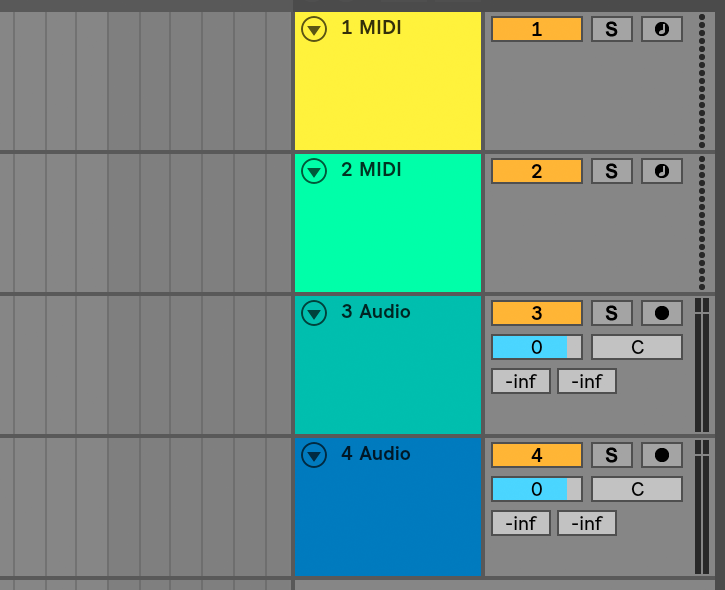
I'll just let that sit thereSoundtrackband wrote:...seems kind of dumb not to have a mute button on every track right next to the solo button.

Re: Lack of a real mute button per tracks
Generally speaking it's an handy thing to mix with a Utility at the end of your track's chain, and use the track's mixer in a more "global" context.
Ableton Forum Moderator