Hi all,
I´ve bought a new audio interface (Audient iD14) which in general is running nicely with a very decent audio quality. But since then I have audio dropouts in Ableton Live 10 (current version) whenever I select a new preset in Diva (which is my favorite and most permanently used synth).
I know that Diva can be very CPU-hungry but this should not be the reason for the problem as it did not happen with the internal soundcard of my 6-core Macbook even in full-blown Ableton projects. With the Audient I have to select an unfeasible latency of 2048 samples in order to have at least a chance to avoid those dropouts while I could easily run Ableton with a 256 samples buffer with the internal soundcard. And the Audient is using the same Core Audio driver.
Of course I thought in the first place that the audio interface must be responsible for this behaviour. But I´ve tested the same procedure with the Audient in Native Instruments Maschine. And here I could easily go down to 128 or 64 samples with a similar CPU load without dropouts when changing Diva´s presets.
So is there anyone out there using u-he synths and/or Audient interfaces together or someone else having audio dropouts when changing presets?
I really would like to further locate those problems so maybe Ableton could do something for it.
Thanks in advance and best regards,
Michael
Audio dropouts when changing presets in Diva
-
michaelous
- Posts: 4
- Joined: Wed Feb 13, 2019 9:00 am
-
jestermgee
- Posts: 4500
- Joined: Mon Apr 26, 2010 6:38 am
Re: Audio dropouts when changing presets in Diva
Try disable the option "Reduce Latency while Monitoring"
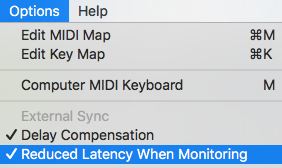
https://help.ableton.com/hc/en-us/artic ... onitoring-
It has to be disabled every time you open a project but it may take the dropouts away
https://help.ableton.com/hc/en-us/artic ... onitoring-
It has to be disabled every time you open a project but it may take the dropouts away
-
michaelous
- Posts: 4
- Joined: Wed Feb 13, 2019 9:00 am
Re: Audio dropouts when changing presets in Diva
Did not help unfortunately....jestermgee wrote: ↑Wed Feb 13, 2019 9:27 pmTry disable the option "Reduce Latency while Monitoring"
I've also checked if plugging the interface to a Thunderbolt3 hub would make any difference (as adviced in this article about Apple´s audio glitch bug https://cdm.link/2019/02/apple-2018-glitch/)
- but nope
