Hi,
So I opened a new session in ableton and created some audio tracks. The session only has
5 audio tracks and a master track.
I tried to drag and drop a wav file onto the audio track in the arrangement view and the file shows up
but there are no visible wave forms and it doesn't play any sound when I hit play.
I recorded the wav files in reaper.
They're rendered as 44.1 at 16 bit.
I've also tried 24 bit and still the same thing.
I don't understand why they won't play.
They play when I open them in iTunes.
Ableton 10 won't play wav files
-
notinflight
- Posts: 15
- Joined: Wed Nov 06, 2019 8:21 pm
Re: Ableton 10 won't play wav files
I just got them to load in ableton after giving the tracks a few minutes to just chill
with the wav files and now they play.
The only problem is somehow ableton deleted any regions of silence in the wav files so I have no idea where to
arrange them so they play at the correct places.
How can a piece of software this expensive be this crappy?
There's also this weird wobble in the sound that isn't there in iTunes, windows media player, or reaper.
with the wav files and now they play.
The only problem is somehow ableton deleted any regions of silence in the wav files so I have no idea where to
arrange them so they play at the correct places.
How can a piece of software this expensive be this crappy?
There's also this weird wobble in the sound that isn't there in iTunes, windows media player, or reaper.
-
notinflight
- Posts: 15
- Joined: Wed Nov 06, 2019 8:21 pm
Re: Ableton 10 won't play wav files
Scratch that, it's not just removing regions where there's silence it's also clipped or trimmed out entire regions
with audio too...???
with audio too...???
Re: Ableton 10 won't play wav files
It sounds to me like you want to disable ‘Auto-Warp Long Samples’ in the Record/Warp/Launch tab of Live’s Preferences.
For more details about this and other warp-related settings such as the many warp modes, it is worth reading section 9 of the manual: https://www.ableton.com/en/manual/audio ... d-warping/. (In fact, it is worth taking the time and effort to read the entire manual, which is actually very good.)
For more details about this and other warp-related settings such as the many warp modes, it is worth reading section 9 of the manual: https://www.ableton.com/en/manual/audio ... d-warping/. (In fact, it is worth taking the time and effort to read the entire manual, which is actually very good.)
MacBook Pro, macOS Sequoia, 2.3GHz i7-1068NG7, 32GB – Live Suite 12.1, Max 8.6.5, Scarlett 4i4
-
notinflight
- Posts: 15
- Joined: Wed Nov 06, 2019 8:21 pm
Re: Ableton 10 won't play wav files
Okay, I'll give that a try.
I've been using reaper for years now and switching to ableton has been
very frustrating. It feels like every time I have a question and just try to google it
I end up in one of three places:
a. A 10-20 minute youtube video that could probably be summed up in a 2 minutes-to-read paragraph
b. The ableton manual, which for some reason or another, always covers the topic I'm trying to understand
but it does not offer the info about the topic I need, or has no images/screenshots that are helpful
c. The ableton forum, where the topic is discussed but either not the part I'm looking for or without any screenshots.
I have to admit ableton's plugins and sound/production quality just sounds slightly better than my other daw but
I always just find myself pulling my hair out over something I'm super comfortable with in other daws.
example: I just tried googling how to turn the info view back on, as I disabled it at first because it was slightly annoying and the info
tabs that pop up aren't very good at getting across what things are but the loop I described above just happened.
I've been using reaper for years now and switching to ableton has been
very frustrating. It feels like every time I have a question and just try to google it
I end up in one of three places:
a. A 10-20 minute youtube video that could probably be summed up in a 2 minutes-to-read paragraph
b. The ableton manual, which for some reason or another, always covers the topic I'm trying to understand
but it does not offer the info about the topic I need, or has no images/screenshots that are helpful
c. The ableton forum, where the topic is discussed but either not the part I'm looking for or without any screenshots.
I have to admit ableton's plugins and sound/production quality just sounds slightly better than my other daw but
I always just find myself pulling my hair out over something I'm super comfortable with in other daws.
example: I just tried googling how to turn the info view back on, as I disabled it at first because it was slightly annoying and the info
tabs that pop up aren't very good at getting across what things are but the loop I described above just happened.
Re: Ableton 10 won't play wav files
Fully appreciated. Live is a large and, at least at first, a complex and seemingly incomprehensible DAW. And yes, Live often thinks differently. Every DAW has its own strengths and weaknesses, and Live is no exception. Be patient.
As for learning Live, there is a very good and rather complete video course available through LinkedIn Learning (formerly Lynda.com) entitled Live 10 Essential Training. It is long, I believe over 12 hours of videos, but after watching it you have a good idea of pretty much all of Live and how its many pieces fit together. A 30-day free trial is available, and at least in the US many public libraries provide a free subscription.
Part of the difficulty is that Live does indeed have a steep learning curve, in large part because it provides the tools needed for many different workflows. Some people use it for live DJing, others for EDM production and still others for studio mixing and mastering. I myself use it mostly as a DAW front-end for sound design and analysis in Max. Live’s ability to fulfil all of these rôles means that there are often several ‘right’ ways to do something. There is no single ‘Live way’ to do some of the things which in other DAWs might be more constrained to a single ‘obvious’ workflow. With capability comes complexity—and that steep learning curve. Hang in there. In time, as you explore and begin to find your own workflow, it all (mostly) makes sense.
And yes, the manual is excellent but sometimes doesn’t answer questions directly. For better or for worse, Live allows you to be as creative with your workflow as you are with your music. This flexibility makes it difficult for the authors of the manual to tell you what to do and how you should do it. Even after many years I still occasionally discover, by re-reading bits of the manual and by following discussions on these forums, new and interesting things that I had not previously thought to try.
Sorry for being so long-winded (and no doubt repetitive). If you can, though, I highly recommend that you make the time for something such as the LinkedIn Learning course. The time invested will, in the long run, repay itself many times over. And of course, always feel free to ask questions here on the forums, where others with far more—and often very different—experience and knowledge than mine are likely to answer.
As for learning Live, there is a very good and rather complete video course available through LinkedIn Learning (formerly Lynda.com) entitled Live 10 Essential Training. It is long, I believe over 12 hours of videos, but after watching it you have a good idea of pretty much all of Live and how its many pieces fit together. A 30-day free trial is available, and at least in the US many public libraries provide a free subscription.
Part of the difficulty is that Live does indeed have a steep learning curve, in large part because it provides the tools needed for many different workflows. Some people use it for live DJing, others for EDM production and still others for studio mixing and mastering. I myself use it mostly as a DAW front-end for sound design and analysis in Max. Live’s ability to fulfil all of these rôles means that there are often several ‘right’ ways to do something. There is no single ‘Live way’ to do some of the things which in other DAWs might be more constrained to a single ‘obvious’ workflow. With capability comes complexity—and that steep learning curve. Hang in there. In time, as you explore and begin to find your own workflow, it all (mostly) makes sense.
And yes, the manual is excellent but sometimes doesn’t answer questions directly. For better or for worse, Live allows you to be as creative with your workflow as you are with your music. This flexibility makes it difficult for the authors of the manual to tell you what to do and how you should do it. Even after many years I still occasionally discover, by re-reading bits of the manual and by following discussions on these forums, new and interesting things that I had not previously thought to try.
Sorry for being so long-winded (and no doubt repetitive). If you can, though, I highly recommend that you make the time for something such as the LinkedIn Learning course. The time invested will, in the long run, repay itself many times over. And of course, always feel free to ask questions here on the forums, where others with far more—and often very different—experience and knowledge than mine are likely to answer.
MacBook Pro, macOS Sequoia, 2.3GHz i7-1068NG7, 32GB – Live Suite 12.1, Max 8.6.5, Scarlett 4i4
-
jestermgee
- Posts: 4500
- Joined: Mon Apr 26, 2010 6:38 am
Re: Ableton 10 won't play wav files
That should have been very simple to google...notinflight wrote: ↑Tue Dec 31, 2019 5:10 pmexample: I just tried googling how to turn the info view back on, as I disabled it at first because it was slightly annoying and the info
tabs that pop up aren't very good at getting across what things are but the loop I described above just happened.
I google this: "Ableton Info Panel"
And the VERY first result is this:
https://www.ableton.com/en/manual/first-steps/
You really should actually sit with a coffee / beer / joint or whatever relaxes you and just have a casual read of the manual because it seems like you're slipping up on the basic steps that are covered pretty well in the manual and beginner videos.
Re: Ableton 10 won't play wav files
Every audio program needs time to analyze the file to be able to display the waveform. Live also calculates the warp settings, which is why it takes a bit longer.notinflight wrote: ↑Thu Dec 26, 2019 6:58 pmI just got them to load in ableton after giving the tracks a few minutes to just chill
with the wav files and now they play.
notinflight wrote: ↑Thu Dec 26, 2019 6:58 pmThe only problem is somehow ableton deleted any regions of silence in the wav files so I have no idea where to
arrange them so they play at the correct places.
Do these steps in this order for each audio file you import:notinflight wrote: ↑Thu Dec 26, 2019 6:58 pmThere's also this weird wobble in the sound that isn't there in iTunes, windows media player, or reaper.
1) Turn Warp off in the audio Clip View window
Manual 8.2.1:
- this way you are sure that the Live doesn't change the speed (and consequently the length) of your audio
- this will also get rid of that "weird wobble in the sound"
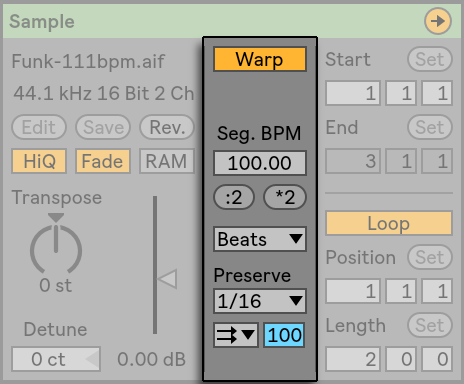
2) Then in the arrangement view make sure to fully extend the audio clip (in both directions).
- this way you are sure that the full audio of the audio clip is available for viewing and playback in the arrangement
Live doesn't delete anything when you import it. So if the above two steps result in some audio parts missing in the arrangement view, then it means it is missing in the file you imported and not due to anything Live "did".
Obviously, I understand the frustration of trying to understand something new and that works differently than you may be used to, but I would think 10 times before making such remarks as a newbie to the softwarenotinflight wrote: ↑Thu Dec 26, 2019 6:58 pmHow can a piece of software this expensive be this crappy?
