I have installed the latest MOTU driver I could find (MOTU Audio Installer 1.6 (83634)), and when I boot up my laptop and switch on the Ultralite it automatically opens the MOTU Audio Setup software, which is configured as you can see below.

When I open Ableton Live, it allows me to select the Ultralite as both the input and output, and the outputs work perfectly, however, it does not appear to recognise it as an input source, with an exclamation mark appearing next to the Audio Device Input, as you can see in the image below, yet it clearly sees the Ultralite as the output device. It also appears to not recognise the Channel Configuration, with an exclamation mark appearing next to it.
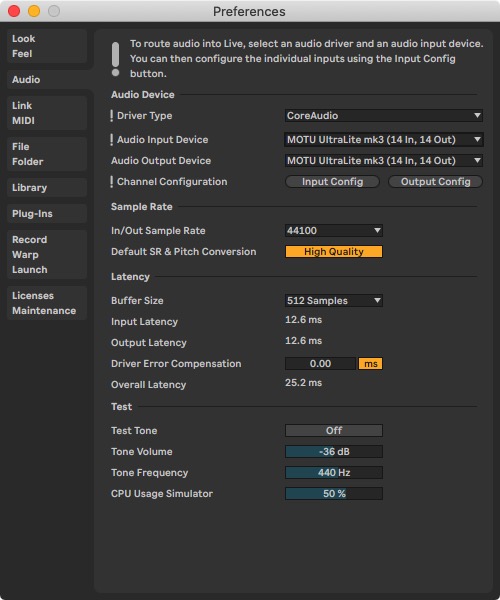
I have configured the inputs correctly, as seen below.
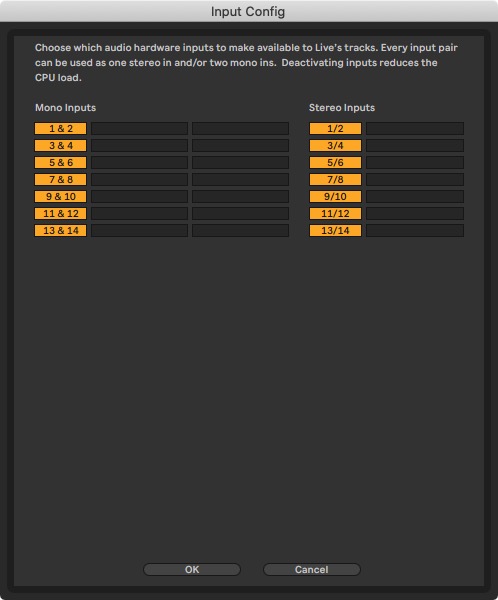
The meters on the front of the Ultralite clearly show audio going into the unit, but somewhere between the unit and laptop the audio is not getting through. I have tried inputting audio from a mic as well as line inputs, but to no avail.
I have looked at the Audio MIDI Setup utility, and all of the channel volumes appear to be set at zero, but they are greyed out, with no way of turning them up, as can be seen in the image below.
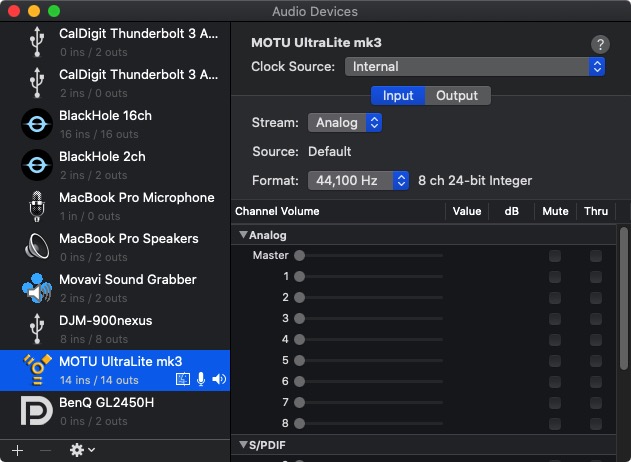
I can only come to the conclusion that is a software issue, but have no idea how to proceed. Is there something I am missing in the overall configuration? Have any of you ever encountered this issue, and if so, how did you overcome it?
Thanks in advance for any help you can offer.