Hi, I'm a month and a half into learning Ableton. I'm laying out drum patterns and sometimes the notes don't work (ex: hi hat). It only plays when I remove other notes on the timing grid.
I also have the same problem using this:
https://learningmusic.ableton.com/make- ... beats.html
When there are too many notes, some will not sound.
I'm thinking I need an audio interface or something?
Some midi notes are not sounding
-
SlothFingers54
- Posts: 2
- Joined: Sun Sep 04, 2022 4:20 pm
Re: Some midi notes are not sounding
I am having similar problems but not with drums only. I added a synthesizer track to a song I was working on. If I duplicate the track, notes are missing in the duplicate. If I re-arrange the original track, say delete a few bars in the middle to replace them, the track downstream goes dead. Even though I can see the notes in the track and the notes ahead of the deletion still play. The strange thing is I made a base line in the same project and this did not happen. All the base notes played regardless of re-arranging or duplicating. So far only happens with synths.
Drums are a different problem for me. I am using EZDrummer2 and say I record a groove preset and then at some point add fills or change the groove completely, on playback it is only whatever preset was on last. It completely ignores the changes even though again, I can see the difference in the drum patterns in the track.
I have recorded multiple track with my guitar using a LINE 6 Helix LT for effects and those tracks I can manipulate to the smallest detail and they all work fine. So all my problems have been with MIDI tracks.
Pretty frustrating.
Drums are a different problem for me. I am using EZDrummer2 and say I record a groove preset and then at some point add fills or change the groove completely, on playback it is only whatever preset was on last. It completely ignores the changes even though again, I can see the difference in the drum patterns in the track.
I have recorded multiple track with my guitar using a LINE 6 Helix LT for effects and those tracks I can manipulate to the smallest detail and they all work fine. So all my problems have been with MIDI tracks.
Pretty frustrating.
-
gorillamode200
- Posts: 9
- Joined: Fri Sep 09, 2022 5:56 am
Re: Some midi notes are not sounding
I think it's something to do with like too many input... signals... iono I suck with technical terminology cuz I'm still so new lol but I just don't know what I should do about it or how to fix it. I tried to install ASIO4ALL but that didn't do anything. Also, it being that I am also having the same problem on the Ableton beat making website leads me further to believe, again, that it has too much input, signals.. or whatever, and our computer can't handle it.
Last edited by gorillamode200 on Fri Sep 09, 2022 7:32 am, edited 4 times in total.
Re: Some midi notes are not sounding
As you point out below, not having the terminology makes it hard to describe the issue.gorillamode200 wrote: ↑Fri Sep 09, 2022 6:05 amHi, I'm a month and a half into learning Ableton. I'm laying out drum patterns and sometimes the notes don't work (ex: hi hat). It only plays when I remove other notes on the timing grid.
I also have the same problem using this:
https://learningmusic.ableton.com/make- ... beats.html
When there are too many notes, some will not sound.
I'm thinking I need an audio interface or something?
The grid is the piano roll. You say too many notes. How many? Are you sure is this? Do you mean too many simultaneous notes?
What do you mean by input things? Is it MIDI tracks?
I’d suggest it’s not the lack of an audio interface. It sounds like wherever the cause, it’s merely some issue of MIDI programming.
Here’sa reason why a note might not be heard-
Choke groups. One MIDI note can be set to always block another from sounding. The reason is so that for example a closed hihat sample on one note will always stop an open hihat (on a different note) from continuing to sound, like a real drum kit.
Another reason may be to do with available voices in a synth. If I’m using Analog, and the number of voices is currently limited to 4, for example, then if I attempt to play more then four simultaneously, then they will not all sound - only four will be heard.
In both of these examples, it doesn’t matter where the MIDI input is coming from. I could be playing it in the moment with some kind of controller keyboard or pads, or it could be playing back from a MIDI region that I’ve added notes to.
-
gorillamode200
- Posts: 9
- Joined: Fri Sep 09, 2022 5:56 am
Re: Some midi notes are not sounding
I changed "things" to "signals".
Image to describe exactly what I'm talking about:
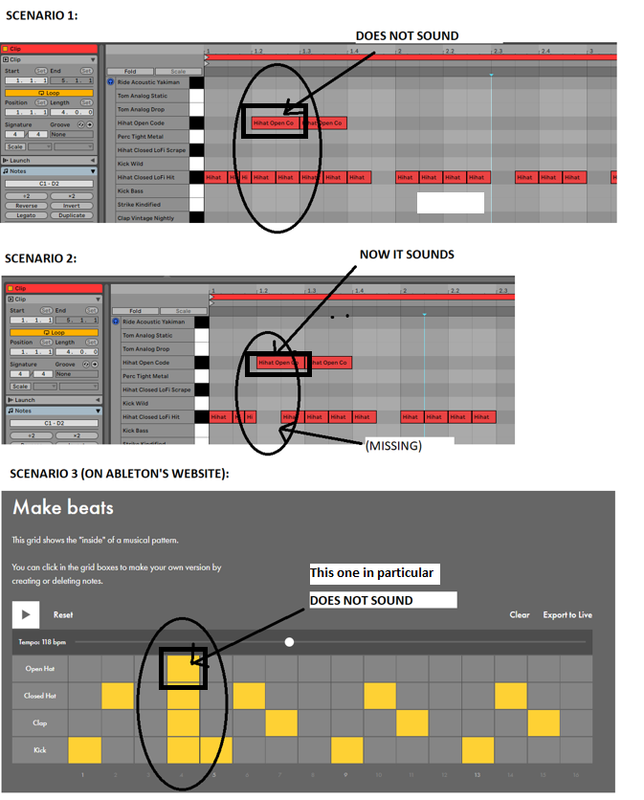
Image to describe exactly what I'm talking about:
Re: Some midi notes are not sounding
For drums they call it ‘choke groups’. On a real cymbal, it’ll only react to one hit at a time. To try and replicate this, software has made it so that you can assign certain ‘hit’ sounds to a Group where no natter how many you trigger, only one will sound at any given moment, usually the most Recent one (which means whichever shows Later on the timeline)
In Drum Racks, there is the ability to create several choke groups. Each is assigned a number. If all the cymbals are on 1, maybe you can put all the chimes on 2, etc. and then you can play a cymbal and chime simultaneously but if you try to play more than one chime simultaneously, you’ll only hear one at a time since each chime sound is in the same choke group.
If you do not want this kind of behavior, you can go into drum rack’s settings for each sound, like for the hats, and change choke group to None.
Another benefit of using the choke group is to ensure that the Tail end of the open hat gets cut off when the closed hat is triggered, or when the open hat retriggers. This tames the potential unruliness of all that extra sound from the open hat sample playing out fully.
In Drum Racks, there is the ability to create several choke groups. Each is assigned a number. If all the cymbals are on 1, maybe you can put all the chimes on 2, etc. and then you can play a cymbal and chime simultaneously but if you try to play more than one chime simultaneously, you’ll only hear one at a time since each chime sound is in the same choke group.
If you do not want this kind of behavior, you can go into drum rack’s settings for each sound, like for the hats, and change choke group to None.
Another benefit of using the choke group is to ensure that the Tail end of the open hat gets cut off when the closed hat is triggered, or when the open hat retriggers. This tames the potential unruliness of all that extra sound from the open hat sample playing out fully.
Re: Some midi notes are not sounding
Yeah… choke groups are your issue. Or rather, that’s the reason behind what you’re experiencing.gorillamode200 wrote: ↑Fri Sep 09, 2022 7:36 amI changed "things" to "signals".
Image to describe exactly what I'm talking about:
Read up in the manual. Everything is working as it should.
-
dannyvocal
- Posts: 13
- Joined: Thu Feb 25, 2021 12:23 am
Re: Some midi notes are not sounding
I just had a similar problem which is how I landed here in this discussion. I played a long bass sequence on an external midi controller but some notes in my sequence were not heard upon playback even though I could see the notes in Ableton. The answer that someone else gave above that some synths might only play four notes simultaneously gave me the idea that maybe the internal synth making the notes could not play said notes that low. When I raised them an octave, I could hear them. The prior note F was heard, but one note lower was clearly out of the range for that synth, so no E. Of course, being a bass it still sounded fairly low and I just left it but I could imagine if you really wanted that super low bass sound, the kind that is so low that you feel the furniture rattling and your ear can barely make out the notes, you would then have to go to another synth in Ableton (of which incidentally there would be hundreds to choose from).