Unable to use one Key Mapping to trigger 2 different Macro Variations on separate Tracks

Discuss music production with Ableton Live.
Post Reply
JZ Chicago
Posts: 15
Joined: Mon Feb 29, 2016 3:19 am

Unable to use one Key Mapping to trigger 2 different Macro Variations on separate Tracks

Post by JZ Chicago » Sat Dec 24, 2022 2:27 pm

Trying to use one Key Mapping (number pad "1" for example) to toggle two different Macro Variations on two separate tracks. Ableton says I cant do that because they conflict. What gives?

I can assign Numpad "1" to toggle several other things simultaneously via Key Mappings. Why cant I assign it to control two different Macro Variation buttons?
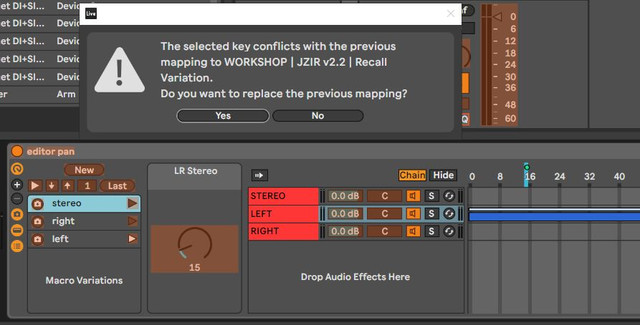
Image

Oddly enough, Im able to multi-keymap the up/down arrows and the "master" play/bang button on Macro Controls located on different tracks with a single key mapping (the Key Mapping buttons at the top of the Macro Variation area).

The only part of the Macro Variations that seem to require unique Key Mappings are the individual play/bang buttons for individual Macro Variation states. Of course, these are the ones I want to utilize.


Ive raised this to support as well but Im hoping someone here has a solution. Ive not used Macro Variations much until just now so I may be missing something obvious.

S4racen
Posts: 5987
Joined: Fri Aug 24, 2007 4:08 pm
Location: Dunstable
Contact:

Re: Unable to use one Key Mapping to trigger 2 different Macro Variations on separate Tracks

Post by S4racen » Mon Dec 26, 2022 9:06 pm

There is no solution, this is as designed, please refer to the manual and the lessons.

Cheers
D

Post Reply