Page 1 of 1
creating a visual interface for live
Posted: Fri Sep 08, 2023 10:56 am
by Eno Gata
hey everybody!
disclaimer: i'm new here, this is my first post.
i am preparing a liveset and am looking for a way to easily keep an overview of certain parameters in live that i am controlling with a midi-controller.
i am controlling a lot of effects with midi-controllers and it's hard to keep track of what effect is on or off and where the parameters are at the moment. what i am imagining is a (probably max-for-live-)device that is just a big box, doing nothing but displaying some parameters from the different effects i am using, as well as tempo and channel levels.
has anybody ever heard of something like that? or an idea how to build that? i have basic knowledge with max, so a shove in the right direction would be enough to send me digging myself. i also have an ipad that i don't use in the liveset so far, so maybe an app would be an option as well? maybe touch-osc?
all tips are much appreciated! thanks in advance and all the best!
Re: creating a visual interface for live
Posted: Fri Sep 08, 2023 2:04 pm
by chapelier fou
Touch OSC or Mira would do the job !
Re: creating a visual interface for live
Posted: Sat Sep 09, 2023 10:41 am
by Angstrom
Yeah. I made a touchscreen interface for live for stage performance in m4l
I've not used it in a couple of years because I went to the dark side (eurorack and hardware seq.). But ...
My interface is on my touchscreen laptop. It is mostly just a heads-up display for my hardware controllers . It has meters for 8 group tracks. BPM display, a big visible beat indicator. Also it shows which scene I'm in, and what clips are current and next. More stuff like that.
It has some touchscreen buttons for things like resetting all group faders to -3db and setting all sends to -inf. For when I need to reset the mix . It also has some "preset selection" buttons for tracks I play. That allows me to do a rack chain select and display the active chain.
There's a few other things. I forget. I used to add stuff to it all the time.
Re: creating a visual interface for live
Posted: Sun Sep 10, 2023 8:47 pm
by Eno Gata
chapelier fou wrote: ↑Fri Sep 08, 2023 2:04 pm
Touch OSC or Mira would do the job !
ok will check them out, have never used them so far. thanks!
Re: creating a visual interface for live
Posted: Sun Sep 10, 2023 8:49 pm
by Eno Gata
Angstrom wrote: ↑Sat Sep 09, 2023 10:41 am
My interface is on my touchscreen laptop. It is mostly just a heads-up display for my hardware controllers . It has meters for 8 group tracks. BPM display, a big visible beat indicator. Also it shows which scene I'm in, and what clips are current and next. More stuff like that.
sounds great! can you explain how you did it? maybe share the code?
Re: creating a visual interface for live
Posted: Mon Sep 11, 2023 1:53 am
by Angstrom
I'm not sure how much use it will be for you, but here it is.
beware - it has the magical ability to crash Live if you edit and save it. That's one of the reasons I abandoned it I think.
hopefully everything got frozen here and is included. You might have to do a "save as" because my server doesnt seem to respect this as a binary
drag it onto master or somewhere, and you should see a big "open" button. that should open a floating "mixer" with some partially functional stuff.
there's enough there to make sense of what you could do for your own purposes. I basically just needed VU meters, and mute indicators. And a thingy that says what the current scene is called, and what the one I'm about to trigger is called.
if it doesnt pick up your track names on load, hit the refresh banger. because that's how crap it is.
amxd link
Re: creating a visual interface for live
Posted: Mon Sep 11, 2023 11:56 am
by Eno Gata
hahaha ok thanks!

i'll check it out. right now i am meddling with touch osc, seems like i will get it working there anyways.
Re: creating a visual interface for live
Posted: Mon Sep 11, 2023 1:05 pm
by Angstrom
Eno Gata wrote: ↑Mon Sep 11, 2023 11:56 am
hahaha ok thanks!
i'll check it out. right now i am meddling with touch osc, seems like i will get it working there anyways.
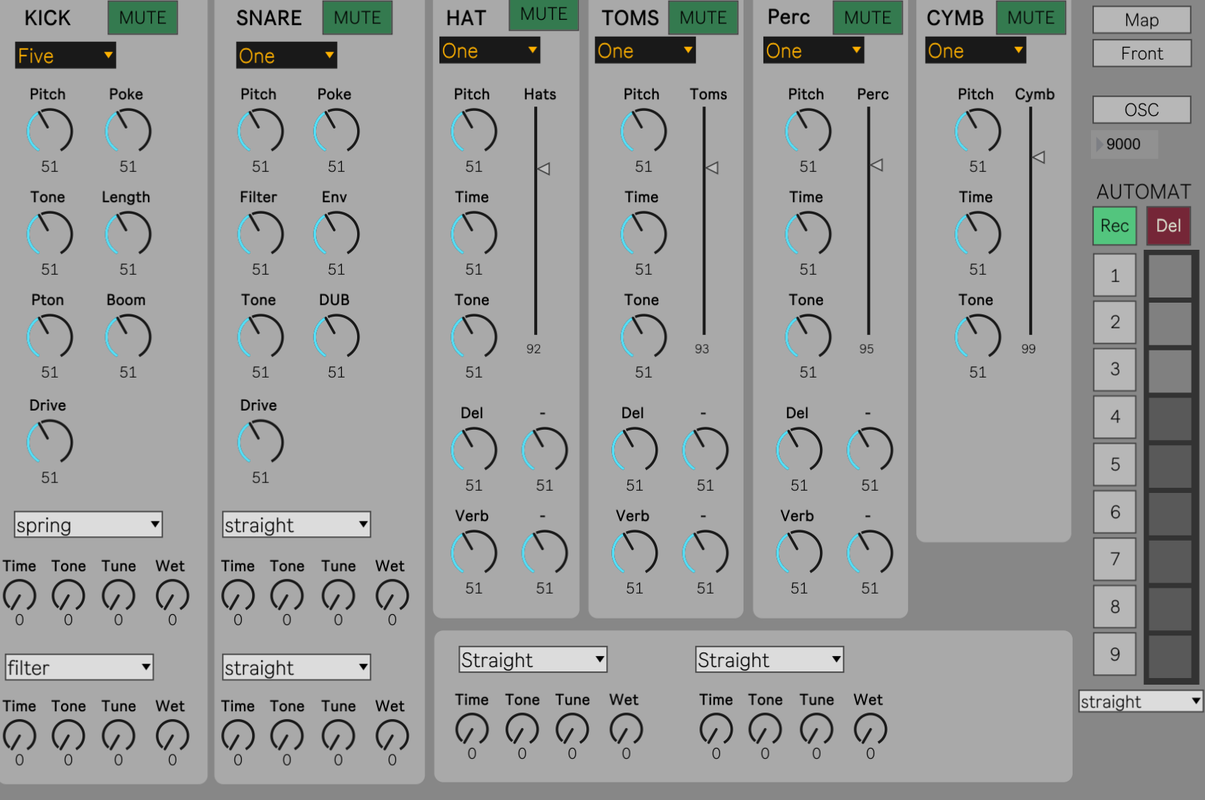
Ok, I've got something that may be a bit more coherent which works with TouchOsc and also with map midi.
Again, it's designed to work in a host set, but you might be interested in how I did the OSC mapper. You'll see there's a built in MIDI mapper, and also an OSC mapper. The reason I duplicate the midi map functionality is so that it's not absolutely controlled (as Ableton do it). In this case there's a many-to-one relationship.
It wont do anything without my drum jammer als, but you will probably be able to pull some useful stuff from the UI.
Drum Jammer UI
Re: creating a visual interface for live
Posted: Thu Sep 14, 2023 10:46 am
by Greenapples2019
I've built a M4L dashboard over the last few months that gives me all the info I need when playing live, including current scene, next scene, GQ, song info, setlist, time, track mutes, bars to end of scene, volume warnings, clock, FX, levels etc etc. It was a good way to learn M4L; I started small (current and next scene) and I've been adding to it when I think of new things. I can explain the elements if that's helpful but I think the code wouldn't be any use to you as i've built it specifically for my use case but it's not complicated, it's just lots of fairly simple patchers, mainly using objects and observers. And I've sized it so that I can still see the Master track.

Re: creating a visual interface for live
Posted: Fri Oct 06, 2023 12:38 pm
by Raccoon13
Hey Eno Gata,
do you still checked this amazing underrated M4L Device?
It's used with TouchOSC and you get many parameters live updated with, parameter values (Bluhand)
https://github.com/zsteinkamp/m4l-Bluhand
There's also a mappable device (Knobbler) where you can store your mappings and use them with other projects.
https://github.com/zsteinkamp/m4l-zs-Knobbler3
Bluhand is the first device name and Knobbler for the second one.
Cheers