Setting up a better timeline and navigation

Discuss music production with Ableton Live.
Post Reply
kuharido
Posts: 8
Joined: Thu Jan 24, 2019 4:19 am

Setting up a better timeline and navigation

Post by kuharido » Mon Dec 18, 2023 7:58 pm

Hi

I'm coming from another DAW (Logic) and trying to orient within Ableton. I've watched as much videos as i can and i think i found most of the equivelants i could do in Logic in Ableton

Where i'm confused and haven't found any resource around is some timeline and navigation issues. Specifically the following:

Midi roll issues

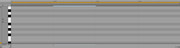
1- In the Midi roll, the bar at the top is confusing on how the numbers are laid out (universal timeline) in 1.1.1 then 1.1.2 and so on, i'd rather just see something like 1 2 3 4 and their subdicisions or at most 1.1 and 1.2 and 1.3 to quickly identify which measure and beat i'm at, how can i edit this setting?
Image

2- Also in the Midi roll (same picture as above) the keyboard layout is a bit unwiedldly for what i'm trying to do. By default it shoes the root note named out only and then there is a lot of space for the keys showing until the octave of the root note (e.g C1 .. key key key key key until C2 labeled) I don't like that only the root is labeled and that there is so much vertical space wasted.
Folding solves this however folding also collapses all other notes that are unused, which is not what i want. I want a fold view with all the keyboard shown

3- Finally also in the Midi roll, when i click on a MIDI region from the arrangment timeline to pop up the rol and edit it, vertically it drops me in weird places that have empty notes, i think it's always programmed to start the view at a fixed note (again something like C3) rather than show the view that matters which is where the notes are


Timeline issues

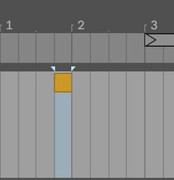
4- How can i extend a MIDI region? i don't want to loop it which seems what the braces do if i go to corners and drag the region, i want to expand the actual length of the midi region
Image

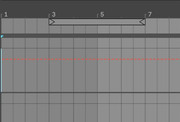
5- In the timeline you see it denotes measure 1 then jumps to 3 ...etc. I figured if i zoom it'll show all the demarkactions (1,2,3...etc) and it does, but how can i save this setting as a default for Ableton everytime it opens? Additionally, is there a way to make the bar markers vertical lines a bit bolder or more distinct, they look exactly like the divisions of half bars
Image

Would really appreciate some starting pointers please! I'm pretty familiar with DAWs and was able to figure everything else out but for some reason the navigation stuff seems really not that intuitive here
kuharido
Posts: 8
Joined: Thu Jan 24, 2019 4:19 am

Re: Setting up a better timeline and navigation

Post by kuharido » Tue Dec 19, 2023 7:42 pm

Bump

TonyReed
Posts: 38
Joined: Sat Aug 24, 2019 3:52 am

Re: Setting up a better timeline and navigation

Post by TonyReed » Tue Dec 26, 2023 1:29 am

Hi, I agree with two of your points here - the midi time line is not clear - both with the way it describes beats and also with where the bar lines are at. I have tried to do more or less what you propose but it cant be done. yes the beats nomenclature is daft and you cant make the grid bolder.
I dont understand what you mean about the midi scroll - dont know how it can be made smaller with out all the notes.
Also for the midi clips - why dont you extend it in the arrangement view - or set the length in the arrange view then right click and select the command that creates a midi clip in the editor ?

kuharido
Posts: 8
Joined: Thu Jan 24, 2019 4:19 am

Re: Setting up a better timeline and navigation

Post by kuharido » Tue Dec 26, 2023 9:42 pm

Thank you so much for the input! Good to know at least there is no way to change those

For the MIDI roll i mean if the MIDI region say has a C6 note, the view it'll show is always centered at C3 even if there is empty notes there which is weird

For MIDI clips extention, that's what i'm trying to do from the arrange window, but when i drag a MIDI region instead of extending it with more empty beats it just loops the original 1 bar section. Do i have to key in the length of bars manually in the properties or can't i extend the MIDI region shown on the arrangement view to actually extend the unique measures in the region

Thank you

TonyReed
Posts: 38
Joined: Sat Aug 24, 2019 3:52 am

Re: Setting up a better timeline and navigation

Post by TonyReed » Wed Dec 27, 2023 11:07 am

Oh yes I get your point about the piano roll - I think your buggered really - good point though. Abletons midi editor is pretty basic I think. It would be good to allow you to fold over the notes you choose not just the notes you have used.
About the midi regions - You can set the loop length manually in the midi editor - I may be still missing your point - but what I do is: drag a region in the arrange window - say 8 bars - then right click and choose insert empty midi clip. The hit Cmd L to create a loop brace over the length of the region I just chosen. If Im still missing your point post some screen shots.

kuharido
Posts: 8
Joined: Thu Jan 24, 2019 4:19 am

Re: Setting up a better timeline and navigation

Post by kuharido » Sun Dec 31, 2023 1:53 pm

Thanks i also didn't know about cmd+L that's helpful

I figured what i was trying to do

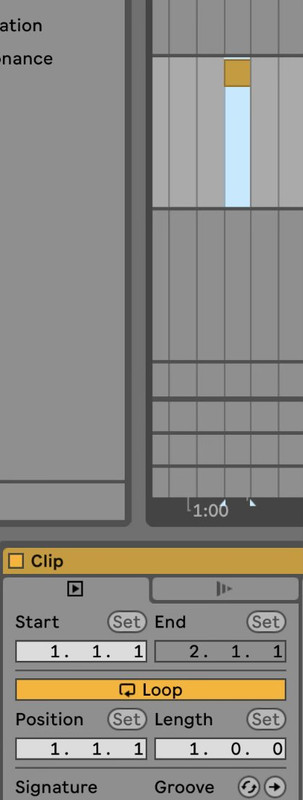
I had to click off the "Loop" button in the MIDI editor of the clip such that when i'm dragging it on the arrangement timeline it's extending the region over as many bars instead of looping 1 bar over several bars. In other DAWs i'm accustomed to there is a drag (upper right corner) that by default extends the bar length of the region and another (from the middle of the region height) that expands the region over several bars, i didn't find the latter in Ableton but it looks like i drag from top righ then turn off loop

Image

kuharido
Posts: 8
Joined: Thu Jan 24, 2019 4:19 am

Re: Setting up a better timeline and navigation

Post by kuharido » Sun Dec 31, 2023 1:57 pm

Also here is another post on reddit that i found and they tried to articulate the same thing, wasn't concluded so it loks like Loop being on is the only default behavior for newly created MIDI regions

https://www.reddit.com/r/ableton/commen ... ing_to_be/

Post Reply