Hello to all,
I love the FM8 Arpeggiator
I want to assign a knob on my Photon X 25 in Live that can switch the Pattern Editor Length but I dont know how.
Is there someone who can help me - and others who want that?
I know that it must be possible, jet I can do it with the mouse wheel but I want it on my midi-keyboard
it is very cool to switch with the length to make a cool step sound
but I am soo noob to assign midi cc
so pls help me
when I click "midi Learn" and go to the Pattern Editor the length is marked with a red border -- but when I turn on my knob on photon x25 there is nothing
can I solve my wish/problem or is it impossible?
Midi Learn - FM8 Pattern Editor - on Photon X25 how?!
Had that same thing with FM8, it doesn't seem to like remote control and is probably down to FM8 configuration or maybe even a flaw in the VSTi itself, there are probably other ways (this way doesn't support parameter feedback for instance) but this is how I got around that problem:
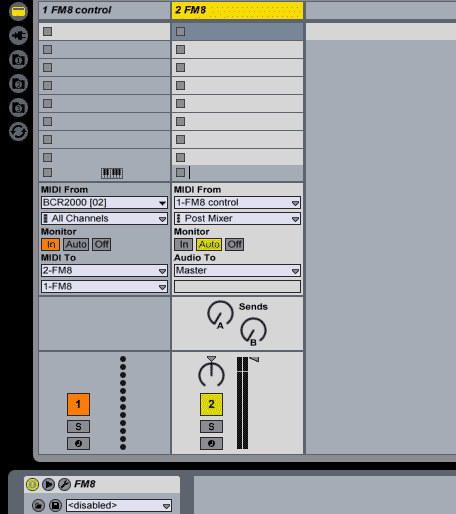
MIDI track on the right is the one I have containing FM8, the one on the left routes MIDI controller data from my BCR2000 to the one on the right, automation doesn't work this way either - instead you'd have to record a MIDI clip containing the controller data into the left-hand track and edit it if needed from the envelope editor window - hope this isn't confusing you further!
It does work eventually so stick with it.
MIDI track on the right is the one I have containing FM8, the one on the left routes MIDI controller data from my BCR2000 to the one on the right, automation doesn't work this way either - instead you'd have to record a MIDI clip containing the controller data into the left-hand track and edit it if needed from the envelope editor window - hope this isn't confusing you further!
It does work eventually so stick with it.