Search found 30 matches
- Wed Mar 06, 2013 2:01 pm
- Forum: Ableton Live
- Topic: Live 9 Suite Pricing
- Replies: 3
- Views: 1152
Re: Live 9 Suite Pricing
It does not feel like Ableton appreciates customer loyalty. They are capitalizing on the inevitable feeding frenzy that comes with a new release. They must figure that people will just pull out the credit card and worry about paying it off later. I buy responsibly by only spending money I have ...
- Wed Mar 06, 2013 1:44 pm
- Forum: Ableton Live
- Topic: Live 9 Suite Pricing
- Replies: 3
- Views: 1152
Live 9 Suite Pricing
The release of 9 is very exciting. I want to upgrade as soon as possible.
It is pretty uncool, however, that the $100 discount goes away on March 12.
I own 8 Suite and MaxforLive. I think the price I am being offered now should just be the price in perpetuity. We are basically being told, Come up ...
It is pretty uncool, however, that the $100 discount goes away on March 12.
I own 8 Suite and MaxforLive. I think the price I am being offered now should just be the price in perpetuity. We are basically being told, Come up ...
- Sat Sep 29, 2012 6:27 pm
- Forum: Feature Wishlist
- Topic: More favorites-folders for library
- Replies: 4
- Views: 6959
- Sun Aug 26, 2012 11:51 am
- Forum: Feature Wishlist
- Topic: Detachable Arrangement View Window and...
- Replies: 0
- Views: 631
Detachable Arrangement View Window and...
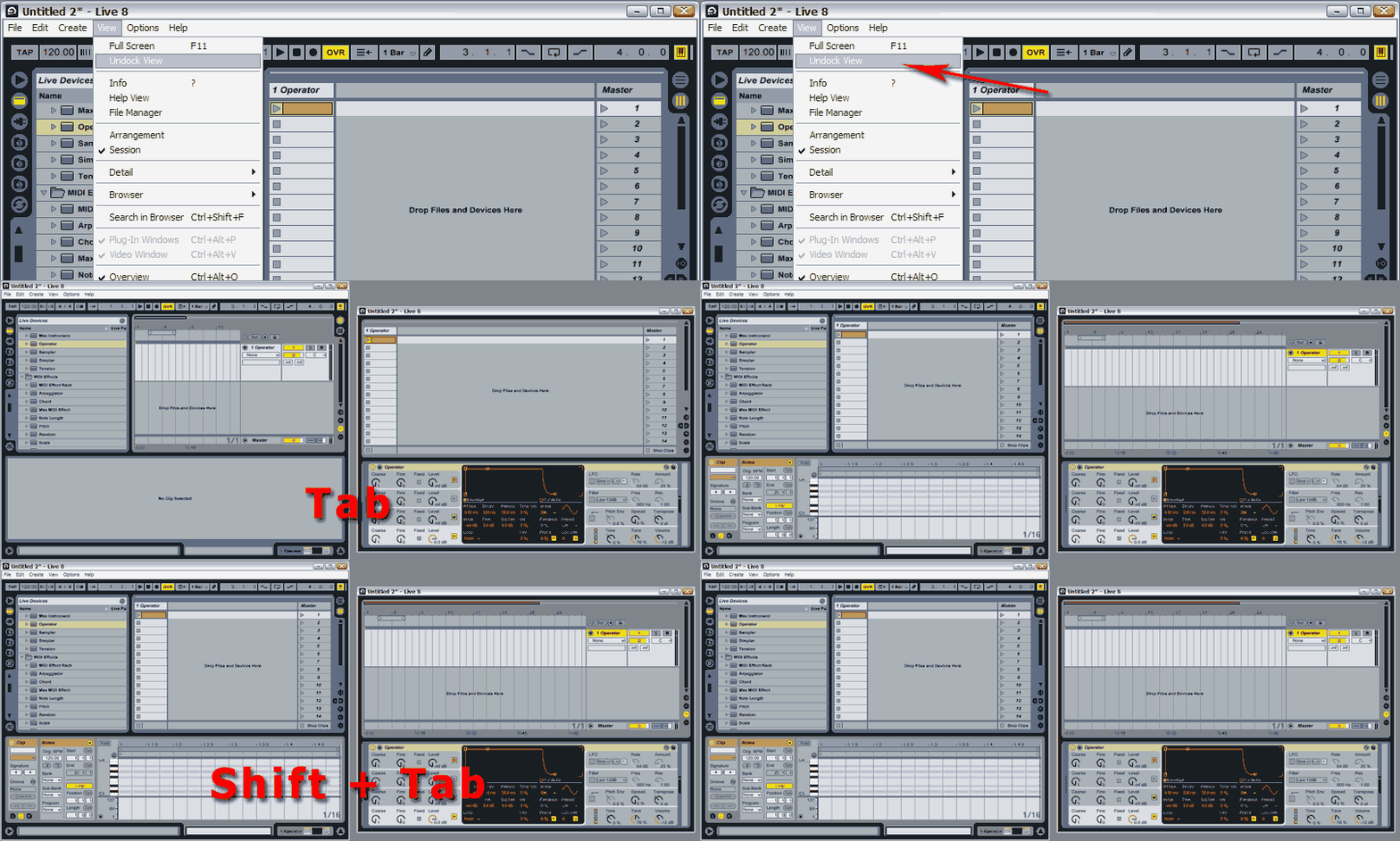
Detachable Arrangement View Window.
Arrangement View headers on the left. Sorry, it's been years and I still can't get used to them on the right.
Arrangement View headers on the left. Sorry, it's been years and I still can't get used to them on the right.
- Sat Nov 12, 2011 1:52 pm
- Forum: Feature Wishlist
- Topic: Dual Monitor Support - Arrangement and Session view
- Replies: 30
- Views: 11948
Re: Dual Monitor Support - Arrangement and Session view
It couldn't be much clearer than that! I hope Ableton see this. Nicely done.NSU_Spray wrote:In my opinion, it would be enough.
- Thu May 12, 2011 10:39 pm
- Forum: Ableton Live
- Topic: Robert Henke Granulator
- Replies: 85
- Views: 25685
Re: Robert Henke Granulator
Hey Robert, thank you for the Granulator!
But where can I find the "additional GranulatorInput device"? :)
Library>Max Audio Effect>Granulator by Monolake.
it's called ml.Granulator Input.
you know,there is a lesson about Granulator(and the new MFL devices) in Live's help view.
I don't seem ...
But where can I find the "additional GranulatorInput device"? :)
Library>Max Audio Effect>Granulator by Monolake.
it's called ml.Granulator Input.
you know,there is a lesson about Granulator(and the new MFL devices) in Live's help view.
I don't seem ...
- Mon May 09, 2011 5:52 pm
- Forum: Users' Help Exchange - closed
- Topic: Sending Click To BAnd Only
- Replies: 10
- Views: 10987
Re: Sending Click To BAnd Only
One more question
How do set Ableton so I can hear the click track if I need to under this set up?
Never mind - particular song froze - I see cue out on the Master. Yes?
Is the audio coming out of output 5 on your interface just going to one set of headphones? If so, just go get yourself a ...
How do set Ableton so I can hear the click track if I need to under this set up?
Never mind - particular song froze - I see cue out on the Master. Yes?
Is the audio coming out of output 5 on your interface just going to one set of headphones? If so, just go get yourself a ...
- Sun May 08, 2011 8:09 pm
- Forum: Users' Help Exchange - closed
- Topic: Sending Click To BAnd Only
- Replies: 10
- Views: 10987
Re: Sending Click To BAnd Only
adamg - and all you other fine ablenites
1. I have created a single track for the drummer. Track 1
2. I have all the A sends in the song going to A Return.
3. On track 1 I have Audio From set to A Return. Post FX
4. Monitor is set to "IN."
5. Audio Out to Ext 5 in which I have the headphones ...
1. I have created a single track for the drummer. Track 1
2. I have all the A sends in the song going to A Return.
3. On track 1 I have Audio From set to A Return. Post FX
4. Monitor is set to "IN."
5. Audio Out to Ext 5 in which I have the headphones ...
- Sun May 08, 2011 5:39 pm
- Forum: Users' Help Exchange - closed
- Topic: Sending Click To BAnd Only
- Replies: 10
- Views: 10987
Re: Sending Click To BAnd Only
Excellent. A vid on youtube showed this. I just wanted to make sure I wasn't missing something with the onboard metronome.
This is better than the onboard metronome as that click is enough to drive anyone insane.
The template is a fine solution. I take it (do not have Ableton open in fron of me ...
This is better than the onboard metronome as that click is enough to drive anyone insane.
The template is a fine solution. I take it (do not have Ableton open in fron of me ...
- Sat May 07, 2011 11:40 pm
- Forum: Users' Help Exchange - closed
- Topic: Sending Click To BAnd Only
- Replies: 10
- Views: 10987
Re: Sending Click To BAnd Only
Easiest way, with the most options is to create a new track (midi or audio) and use whatever kind of sound you want. Some people use JUST a click, with a down on one. Others might use something more complex, as it'd be easier to follow and can reveal more information about the position of the song ...
- Sun Apr 24, 2011 3:27 pm
- Forum: Feature Wishlist
- Topic: Dual Monitor Support - Arrangement and Session view
- Replies: 30
- Views: 11948
Re: Dual Monitor Support - Arrangement and Session view
Absolutely!!ttrev wrote:Would like to see the ability to have Arrangement view and Session view across dual screens
- Sun Apr 24, 2011 3:26 pm
- Forum: Feature Wishlist
- Topic: white text colour (or contrast) , on darker coloured clips.
- Replies: 15
- Views: 4301
Re: white text colour (or contrast) , on darker coloured clips.
YES!!! I mean, YES!!!
- Thu Mar 31, 2011 3:14 pm
- Forum: Feature Wishlist
- Topic: Arrange View Track Headers
- Replies: 1
- Views: 783
Arrange View Track Headers
PLEASE, let's put the track headers on the left, or at least give us the choice. After however many years, I CANNOT get used to them on the right.
There I said it.
There I said it.
- Mon Feb 14, 2011 6:45 pm
- Forum: Ableton Live
- Topic: Analog Filter Frequency Envelope Problem
- Replies: 16
- Views: 5669
Re: Analog Filter Frequency Envelope Problem
I got a reply back from Nico @ Ableton support. He says I can post his reply, so here it is:
Hi John,
thanks for your email. I can reproduce the issue here and have filed a bug report.
> Hope this can be fixed.
Well, I assume that this can be optimized by implementing a smoothing algorithm ...
Hi John,
thanks for your email. I can reproduce the issue here and have filed a bug report.
> Hope this can be fixed.
Well, I assume that this can be optimized by implementing a smoothing algorithm ...
- Sat Feb 12, 2011 4:05 pm
- Forum: Ableton Live
- Topic: Analog Filter Frequency Envelope Problem
- Replies: 16
- Views: 5669
Re: Analog Filter Frequency Envelope
I just tested the same function on Operator and Sampler. No zipper. Frustrating, because Analog is a good synth that I would use more if this was fixed. This is one of those things that slipped through the cracks and will most likely go unresolved. It sure would be cool if they fixed it though.