THEY CAN'T RECORD TO THE MODULATION WINDOW
(unless it's midi CC from the midi track input)
that's probably the holy grail of feature wishlists..
what you're doing is COPY PASTE recorded automation (to the modulation window)
also you do it after the fact.. not on the fly
no disrespect but...copy/paste for envelopes is a well known feature in live...
or any other DAW for that matter...
Getting automation from Arrange View into clips in Session
Re: Recording automation into Clips in Session View
hey...JuanSOLO wrote:no, I am just clarifying the misleading title.funken wrote:So, this false advertising thing, do you want a refund or what?
I feel it's important to be clear about this stuff.this^ is misleading, unclear, false claims.funken wrote:I want the title to reflect what people are looking for, to reflect their problem.
record automation into session view and prove to me it does not look like this.
I would be forever grateful.

if you're on pc...
check options.txt file if you haven't already:
-MidiEventThinning=0
-ThinningAggressiveness=0
but still.. you need some 'thinning' otherwise it's a mess
Last edited by 3dot... on Tue Jul 24, 2012 3:34 pm, edited 1 time in total.

Re: Recording automation into Clips in Session View
I think "false advertising" is a strong phrase to use... funken never claimed to provide a feature that Ableton can't do, he offered a workaround. If you don't want to do it, fine, don't bitch. Juansolo, I wondered if the stepping you demonstrate was something to do with quantisation, but I simply can't get that effect no matter what I do... I'm using UC33 and it provides breakpoints or smooth lines no matter what the settings. What controller are you using?
MacBook Pro Retina, Live 9.5, Reason, UC33, KRK RP5s, Teenage Engineering OP1, Korg ESX2, Korg Prophecy, Clavia Nord Lead, Bass, Guitars.
http://soundcloud.com/motorradkinophone
http://soundcloud.com/motorradkinophone
-
JuanSOLO
- Posts: 3236
- Joined: Sun Jul 15, 2007 8:21 am
- Location: Shreveport LA, sometimes Dallas/Ft Worth TX
Re: Recording automation into Clips in Session View
yeah we went over this one in another thread, and I tried it.3dot... wrote: hey...
if you're on pc...
check options.txt file if you haven't already:
-MidiEventThinning=0
-ThinningAggressiveness=0
I'm not on a PC,
but, this only gave me results in arrangement view
I still get this steppyness when recording into session from my Moog.
OR, I still get it with the previous M4L hack.
Haven't tried your's yet, but I am anticipating the same results.
-
JuanSOLO
- Posts: 3236
- Joined: Sun Jul 15, 2007 8:21 am
- Location: Shreveport LA, sometimes Dallas/Ft Worth TX
Re: Recording automation into Clips in Session View
it's the same weather I am using my Moog, APC40, or Novation SL61telekom wrote:What controller are you using?
Only in session view though, not arrangement.
Re: Recording automation into Clips in Session View
3dot... wrote: hope you don't wait for too long....
here's a version :
http://www.maxforlive.com/library/device/1204/cc-boy
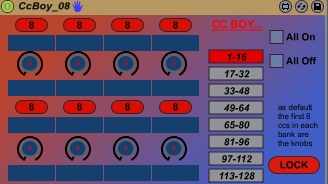
Great!

Just tested, seems very good. I'll let you know a 'stressed' test soon

-
Valiumdupeuple
- Posts: 1155
- Joined: Mon May 31, 2010 12:36 pm
- Contact:
Re: Getting automation from Arrange View into clips in Session
 . I read the original post and checked out the idea, I didn't know 'show modulation' did what it did, so nice one for pointing it out. It makes transferring automaton data a lot easier. its also a good method for getting envelopes which reflect my playing style. Like everyone else I felt dissappointed that you hadn't rewritten the parts of Live's code base that deal with modulation and automation. I am surprised how many extensively some people have kicked off over something that is simply help offered freely to strangers. Check your heads guys.
-
pencilrocket
- Posts: 1718
- Joined: Tue Jun 15, 2010 10:46 am
Re: Getting automation from Arrange View into clips in Session
OP's aim has successfully completed. Original title got much attention.
Re: Getting automation from Arrange View into clips in Session
nice post, always new stuff to learn in ableton!
Re: Getting automation from Arrange View into clips in Session
Good post ken, this is exactly how I've been doing this for some time now.
It's a shame some people can't see past the fact that Live can't record clip automation in session to see that this is an excellent workaround.
It's a shame some people can't see past the fact that Live can't record clip automation in session to see that this is an excellent workaround.
Re: Getting automation from Arrange View into clips in Session
hey man..
you don't need to feel bad..your intentions are good..
and the tips you give are good as well...
you seem like you genuinely want to help..
and you bring a lot of enthusiasm to the table and I really like that..
so understand it's only semantics baby...
not personal..
so no worries mate...
to some of us proper "clip automation recording" is something of a want for at least 5-6 years...
people have gotten old... dead and buried ...(and many more will...)
before this is implemented...

so it's a touchy subject..
you don't need to feel bad..your intentions are good..
and the tips you give are good as well...
you seem like you genuinely want to help..
and you bring a lot of enthusiasm to the table and I really like that..
so understand it's only semantics baby...
not personal..
so no worries mate...
to some of us proper "clip automation recording" is something of a want for at least 5-6 years...
people have gotten old... dead and buried ...(and many more will...)
before this is implemented...
so it's a touchy subject..
-
JuanSOLO
- Posts: 3236
- Joined: Sun Jul 15, 2007 8:21 am
- Location: Shreveport LA, sometimes Dallas/Ft Worth TX
Re: Getting automation from Arrange View into clips in Session
agreed, just trying to help you be more helpful to those looking for help.
my intention was never to be a stick in the mud, or sound disgruntled in any manner.
my intention was never to be a stick in the mud, or sound disgruntled in any manner.
Re: Recording automation into Clips in Session View
Sorry, that was an arsey post I made. Was a tad stressed and nipped into forum for a little light relief.funken wrote: I wasn't saying you don't understand, I just disagree that it's messy. If you have automation in Arrange, and you decide you want to work in Session, this is how you do it. Yes it is a roundabout way if you just want to record directly into Session, but it's the only way.
The ability to record directly into Session wouldn't even be any use if you take the above scenario. I did this because I'd drawn automation into Arrange, but wanted to work in Session.
I'll try to explain. This system works well if you want to make your clips, record all the automation and transfer back to session in that order.
The problems I had were if you already have some automation down and want to start writing new parts. As you've turned up al relevant parameters, you cant just start a new clip as all settings are wrong. You need a blank clip with your default sound as a template.
If you decide to automate a new parameter, you need to copy automation into all clips on that track, regardless of whether they have automation or not.
If you make a copy of an existing clip to put a different automation on, you have to clear the existing envelope, and copy the default sound automation lane back in, just to get you to your starting point to record again. I think, don't remember that part too clearly.
Much of this needs to happen on the arrange page, using whatever space you have available (after any actual arrangement you may have down). So you end with odd clips all over the shop.
None of this is Exactly ideal jam away in session view trying new ideas out workflow. I found it a major ballache and in haste accidentally copied automation to the wrong place several times.
If you can think of easy ways to do all this, then hats off to you.
Re: Getting automation from Arrange View into clips in Session
you can't.. because of the built-in beahavior... clip envelopes will always be dependent on the automation values..
so once you use this method...
it means all automated parameters must stay at 100% if you want to use clip envelopes in this way...
besides.. it's kindof backwards.. if you ask me
explanation:
the way I see the workflow in live is :
session : experimenting/composing/recording
arrangement : arranging/overdubbing/editing/mixing (which all come later)
going back to session to fix stuff.. or adding more stuff..
and going back to arrangement to arrange/mix everything to a render..
then it's mastering time...
when making a set for playing live..
the stuff I don't want to mess with I keep audio..while the rest I intend to tweak on the fly...
I delete some tracks if I have band members playing parts..
I'll change the fx to lighter stuff..
I might create fx tracks clip envelopes for them..using dummy clips..like rises/falls/lfos etc...
the track I just worked on will be just a PART of a larger live set...
and needs to adapt to my live setup
the setup is completely different..
so making a set for playing live is a different process altogether for me...
like the composing phase.. I go back into every detail when making a "live" set .. and "tweak" it so I have control of the stuff I need close at hand ..
and in a logical...live ready order..
constantly stress testing it..
what I was trying to say in all this long thing here..
is that I never ever transfer envelopes from arrangement to session...
even when working on a "live" set..
simply becuase it messes things up in my personal workflow..
and in my perception of clip vs. automation envelopes it's counter productive..
(clip automation being a rhythmical cycling MODULATION..
and arrangement automation being the value to which modulation is applied..
which is used for a longer part and reserved for FINAL un-looped automation..
an automation part which is part of the arrangement.. not the loops)

but I guess it's good for people with a different workflow than mine ..
who just want the same curve .. copied back to session view..
so once you use this method...
it means all automated parameters must stay at 100% if you want to use clip envelopes in this way...
besides.. it's kindof backwards.. if you ask me
explanation:
the way I see the workflow in live is :
session : experimenting/composing/recording
arrangement : arranging/overdubbing/editing/mixing (which all come later)
going back to session to fix stuff.. or adding more stuff..
and going back to arrangement to arrange/mix everything to a render..
then it's mastering time...
when making a set for playing live..
the stuff I don't want to mess with I keep audio..while the rest I intend to tweak on the fly...
I delete some tracks if I have band members playing parts..
I'll change the fx to lighter stuff..
I might create fx tracks clip envelopes for them..using dummy clips..like rises/falls/lfos etc...
the track I just worked on will be just a PART of a larger live set...
and needs to adapt to my live setup
the setup is completely different..
so making a set for playing live is a different process altogether for me...
like the composing phase.. I go back into every detail when making a "live" set .. and "tweak" it so I have control of the stuff I need close at hand ..
and in a logical...live ready order..
constantly stress testing it..
what I was trying to say in all this long thing here..
is that I never ever transfer envelopes from arrangement to session...
even when working on a "live" set..
simply becuase it messes things up in my personal workflow..
and in my perception of clip vs. automation envelopes it's counter productive..
(clip automation being a rhythmical cycling MODULATION..
and arrangement automation being the value to which modulation is applied..
which is used for a longer part and reserved for FINAL un-looped automation..
an automation part which is part of the arrangement.. not the loops)
but I guess it's good for people with a different workflow than mine ..
who just want the same curve .. copied back to session view..