PULL 2.0 iPad Control of Ableton Devices, VST's, Max Devices

Discuss music production with Ableton Live.
xmonsta
Posts: 167
Joined: Sat Mar 16, 2013 3:44 pm

PULL 2.0 iPad Control of Ableton Devices, VST's, Max Devices

Post by xmonsta » Thu Sep 25, 2014 10:29 pm

Hi,

We are very proud to finally launch our much awaited new update to the PULL software, which enables you to control VST, AU plugins and Max for Live Devices directly from your iPad, along with a template for every live native device.

We have also created a simple framework to create your own templates. There is no Max development needed. You can simply create all of your templates in Lemur.

We have also added mixing/volume controls for tracks and also navigation between devices/tracks, which is explained beneath in more detail.

The possibilities are endless.

PULL v2.0 can be found here - http://www.xmonsta.com/product/pull-ipa ... ce-editor/

If you want to read more about PULL, the original forum post is here - viewtopic.php?f=1&t=205227

Demo video here - https://www.youtube.com/watch?v=JeKvW1wvRYI

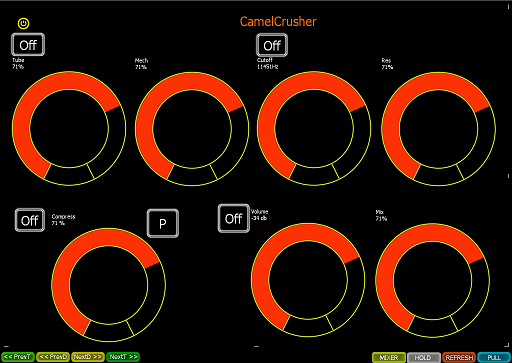
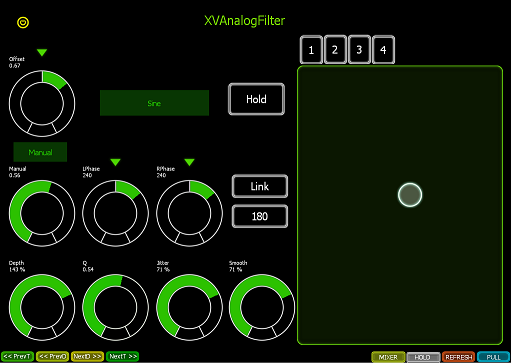
We have added two templates to demonstrate how the external plugin template system works:

CamelCrusher - VST is a free VST plugin. When you select it, our template will load.
Image

XVAnalogFilter.amxd (included inside download folder) - This is one of our own free Max For Live devices, to demonstrate how templating works for Max for Live devices.
Image

Mixer controls - We have also added the ability to control the Mixing controls (volume, solo, mute, pan etc) of the currently selected track

Navigation buttons - We have added the ability to navigate tracks and also devices. This is quite a pioneering system, because it allows you to navigate inside rack chains also. We believe this has not been attempted before in Max or Python programming and should speed up how you navigate around your set.

Drum Pad Names - We've added the ability to update drum pad names, when you rename drum pads. The cool thing is we have now found a way to control the slider on the drum rack, so you can see the visible pads as you scroll up/down.

Hope you enjoy the update and as always, look forward to hearing your feedback.

Cheers

Xmonsta

Last edited by xmonsta on Sun Nov 16, 2014 12:10 pm, edited 4 times in total.
http://www.xmonsta.com Music devices and controllers for Ableton Live

Image

jestermgee
Posts: 4500
Joined: Mon Apr 26, 2010 6:38 am

Re: PULL 2.0 - Control VST's and Max Devices with your iPad

Post by jestermgee » Thu Sep 25, 2014 11:59 pm

WOW!

Looks like I have no more excuses to NOT need this.

login
Posts: 1881
Joined: Sat Jul 16, 2011 12:41 am

Re: PULL 2.0 - Control VST's and Max Devices with your iPad

Post by login » Fri Sep 26, 2014 12:41 am

Is there any way to control a drum rack individual channels?

xmonsta
Posts: 167
Joined: Sat Mar 16, 2013 3:44 pm

Re: PULL 2.0 - Control VST's and Max Devices with your iPad

Post by xmonsta » Fri Sep 26, 2014 12:48 am

login wrote:Is there any way to control a drum rack individual channels?
Hi Login, Which parts of the Drum Rack would you like to control? Volume, Mute, Pan, Solo?

If it's just the Pad to send midi, this is possible now. We will introduce an update shortly to be able to control the Volume, Mute, Pan, Solo of the currently selected drumpad.

Cheers

X
http://www.xmonsta.com Music devices and controllers for Ableton Live

Image

login
Posts: 1881
Joined: Sat Jul 16, 2011 12:41 am

Re: PULL 2.0 - Control VST's and Max Devices with your iPad

Post by login » Fri Sep 26, 2014 2:43 am

xmonsta wrote:
login wrote:Is there any way to control a drum rack individual channels?
Hi Login, Which parts of the Drum Rack would you like to control? Volume, Mute, Pan, Solo?

If it's just the Pad to send midi, this is possible now. We will introduce an update shortly to be able to control the Volume, Mute, Pan, Solo of the currently selected drumpad.

Cheers

X

Yeah I am interested in the mixer, it is one aspect where no other lemur template or app, or any controller for that matter, works. PXT Live can control the drum rack mixer but I would prefert to have this functionality in a Lemur template.

xmonsta
Posts: 167
Joined: Sat Mar 16, 2013 3:44 pm

Re: PULL 2.0 - Control VST's and Max Devices with your iPad

Post by xmonsta » Fri Sep 26, 2014 8:50 am

login wrote:
xmonsta wrote:
login wrote:Is there any way to control a drum rack individual channels?
Hi Login, Which parts of the Drum Rack would you like to control? Volume, Mute, Pan, Solo?

If it's just the Pad to send midi, this is possible now. We will introduce an update shortly to be able to control the Volume, Mute, Pan, Solo of the currently selected drumpad.

Cheers

X

Yeah I am interested in the mixer, it is one aspect where no other lemur template or app, or any controller for that matter, works. PXT Live can control the drum rack mixer but I would prefert to have this functionality in a Lemur template.
For Solo and Mute this is easy. However for Volume and Pan this is more difficult. For instance, there are multiple chains that can be attached to a drum_pad. Which chain volume would you like to have control over? Just one of them? All of them? Each one independently? It's probably quite straight forward if all you want to do is control the volume of the first chain, or perhaps a fixed number of chains (ie up to 3 with the same volume control).
http://www.xmonsta.com Music devices and controllers for Ableton Live

Image

login
Posts: 1881
Joined: Sat Jul 16, 2011 12:41 am

Re: PULL 2.0 - Control VST's and Max Devices with your iPad

Post by login » Fri Sep 26, 2014 2:12 pm

xmonsta wrote:
For Solo and Mute this is easy. However for Volume and Pan this is more difficult. For instance, there are multiple chains that can be attached to a drum_pad. Which chain volume would you like to have control over? Just one of them? All of them? Each one independently? It's probably quite straight forward if all you want to do is control the volume of the first chain, or perhaps a fixed number of chains (ie up to 3 with the same volume control).
Well my overall need is a template that focuses on mixing duties, for the main and any rack mixer. ideally controlling any chain would be nice, but controlling only the main volume of a drum pad would be enough. Sends and Pans are important too (but I pan using utility so for me it's not that a big concern).

Any kind of level metering would be important, but not only the VU meters (in fact this might be not as usefull) also the Peak level reading, and the RME from the master channel.

sonik777
Posts: 105
Joined: Sat May 17, 2014 1:53 am
Location: Detroit
Contact:

Re: PULL 2.0 - Control VST's and Max Devices with your iPad

Post by sonik777 » Fri Sep 26, 2014 4:21 pm

The software looks great!

How does it compare to Live Control 2? I've been trying to use that, but it seems a bit buggy and loses connection frequently (midi hardwired).

kwtsh
Posts: 18
Joined: Fri Oct 05, 2012 8:38 pm

Re: PULL 2.0 - Control VST's and Max Devices with your iPad

Post by kwtsh » Fri Sep 26, 2014 6:30 pm

Looks grat can't wait to try it.

How about emailing existing owners to advise of the new version? (Maybe I missed the email for some reason?)

Brilliant work!

xmonsta
Posts: 167
Joined: Sat Mar 16, 2013 3:44 pm

Re: PULL 2.0 - Control VST's and Max Devices with your iPad

Post by xmonsta » Sat Sep 27, 2014 11:03 am

sonik777 wrote:The software looks great!

How does it compare to Live Control 2? I've been trying to use that, but it seems a bit buggy and loses connection frequently (midi hardwired).
Hi sonik777,

Livecontrol uses sysex over Midi, whereas PULL uses a different way of connecting, OSC over WIFI (it uses the midi daemon only for drum pads and impulse pads). We haven't had any reports of connection dropping while using PULL.

Have you tried using the SHOVE template for Lemur? https://liine.net/en/community/user-library/view/421/ SHOVE uses sysex as well, so you might be able to determine whether it's a general problem with the daemon, or something else.
http://www.xmonsta.com Music devices and controllers for Ableton Live

Image

501dubz
Posts: 53
Joined: Fri Sep 09, 2011 9:29 am

Re: PULL 2.0 - Control VST's and Max Devices with your iPad

Post by 501dubz » Sun Sep 28, 2014 4:25 pm

Bidirectional control doesnt seem to work. Ipad shows the changes and devices alright but computer doesn't respond to any param changes done on the iPad

Is 9.1.5 supported?

xmonsta
Posts: 167
Joined: Sat Mar 16, 2013 3:44 pm

Re: PULL 2.0 - Control VST's and Max Devices with your iPad

Post by xmonsta » Sun Sep 28, 2014 4:35 pm

501dubz wrote:Bidirectional control doesnt seem to work. Ipad shows the changes and devices alright but computer doesn't respond to any param changes done on the iPad

Is 9.1.5 supported?
Hi 501dubz,

Yes 9.1.5 is supported

Your problem is a common problem with general Lemur setup and is unlikely to have anything to do with PULL.

You probably need to ensure that you have your Mac/PC IP address set correctly in the Lemur settings OSC host section, but it could be something else (firewall, network etc)

Feel free to contact support[at]xmonsta[dot]com if you want dedicated help to get it working. We've managed to get every single person set up so far!

Cheers

X
http://www.xmonsta.com Music devices and controllers for Ableton Live

Image

mauronedj
Posts: 315
Joined: Wed Mar 21, 2012 3:20 pm

Re: PULL 2.0 - Control VST's and Max Devices with your iPad

Post by mauronedj » Sun Sep 28, 2014 7:31 pm

Hi Xmonsta,
can you please make the Manual v.2 and some video example?
Thanks,
Mauro

501dubz
Posts: 53
Joined: Fri Sep 09, 2011 9:29 am

Re: PULL 2.0 - Control VST's and Max Devices with your iPad

Post by 501dubz » Sun Sep 28, 2014 11:51 pm

thanks xmonsta that solved it quite nicely.

working now. initial impression is that this is the first meaningful lemur application for me.

what i see on the screen i have in my hands! 8)

Zubben
Posts: 105
Joined: Thu Aug 23, 2007 8:54 pm
Location: London, UK

Re: PULL 2.0 - Control VST's and Max Devices with your iPad

Post by Zubben » Mon Sep 29, 2014 12:04 pm

Does it work fine with Live 9.1.5?

Also, do you plan on making an installer? Installing PULL right now is a bit painful :)

But thanks for the amazing template, very useful!

Post Reply