Search found 231 matches
- Sun Feb 01, 2026 7:03 pm
- Forum: Ableton Live
- Topic: Record in Stereo even if one chanel is silent (Overbrige&Rytm)
- Replies: 6
- Views: 25055
Re: Record in Stereo even if one chanel is silent (Overbrige&Rytm)
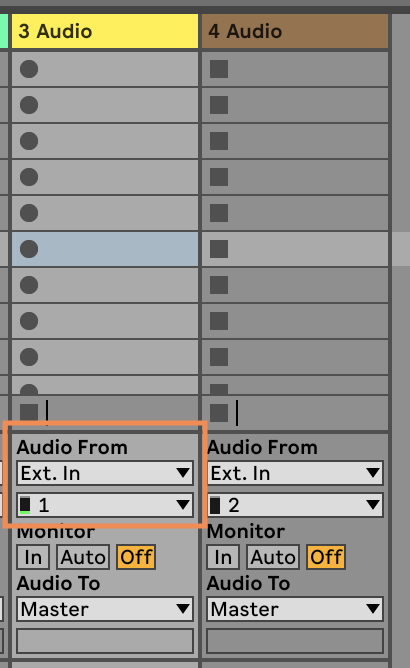
Yes, by selecting only the input channels you want as an audio source. Live will then record a mono track instead of a stereo track with one side silent.
- Sun Feb 01, 2026 5:22 pm
- Forum: Ableton Live
- Topic: Record in Stereo even if one chanel is silent (Overbrige&Rytm)
- Replies: 6
- Views: 25055
Re: Record in Stereo even if one chanel is silent (Overbrige&Rytm)
Do you really want to record two identical channels? Or do you just want the mono channel to be centered instead of panned to the left?
In that case, just select the one channel that has audio as the track source (e.g., channel 1) instead of both channels (1&2). If that option isn't available, you ...
In that case, just select the one channel that has audio as the track source (e.g., channel 1) instead of both channels (1&2). If that option isn't available, you ...
- Mon Jan 26, 2026 4:56 pm
- Forum: Third-Party MIDI Controllers
- Topic: Remote Script for Behringer X-Touch
- Replies: 229
- Views: 1151237
Re: Remote Script for Behringer X-Touch
Apart from the colored screens, the X-Touch behaves exactly like a Mackie Control, so I knew in theory that the script should still work for the MC. Good to hear that you can in fact mix-and-match! As long as you use the X-Touch scripts for all devices, because the main script does indeed look for ...
- Mon Dec 29, 2025 11:06 am
- Forum: Ableton Live
- Topic: How has your stems separation experience been ?
- Replies: 5
- Views: 33245
Re: How has your stems separation experience been ?
I use it to isolate live drums and bass from rehearsal recordings, to quickly get a solid base for the home studio demo of the songs we're working on.
I just record the rehearsal space in stereo using the built-in mics on my 32-bit Tascam recorder. No need to put separate mics all over the drum kit ...
I just record the rehearsal space in stereo using the built-in mics on my 32-bit Tascam recorder. No need to put separate mics all over the drum kit ...
- Tue Dec 23, 2025 9:46 pm
- Forum: Max For Live
- Topic: Dynamic EQ by Rene Sens
- Replies: 4
- Views: 26869
Re: Dynamic EQ by Rene Sens
Finally got a chance to try this. Amazing work. Lots of possibilities (precise compression/expansion of certain frequencies, and of course solving clashing frequencies between tracks!) in a UI that feels perfectly native. Love the resonance/clash detection!!
- Sat Dec 13, 2025 2:08 pm
- Forum: Ableton Live
- Topic: How to record midi clip in session view for as long as you play?
- Replies: 5
- Views: 4019
Re: How to record midi clip in session view for as long as you play?
It sounds like you're overdubbing into an existing clip, which already has a certain length.
To record to a new clip, which will grow to any length until you stop recording, click the black circle in one of the empty slots of your track.
To record to a new clip, which will grow to any length until you stop recording, click the black circle in one of the empty slots of your track.
- Sun Dec 07, 2025 7:16 pm
- Forum: Tips & Tricks
- Topic: Repitch samples independant from project tempo
- Replies: 2
- Views: 26299
Re: Repitch samples independant from project tempo
Depending on the result you're looking for, you could use the Shifter device. Its Coarse pitch parameter is mappable/automatable. It doesn't change smoothly, though: it jumps in semitones from -24 to +24.
However, the Shifter device also has a sidechain option (opened by clicking the little ...
However, the Shifter device also has a sidechain option (opened by clicking the little ...
- Sat Dec 06, 2025 4:50 pm
- Forum: Ableton Live
- Topic: How doubling a voice ?
- Replies: 3
- Views: 2456
Re: How doubling a voice ?
Try the Delay effect, fully wet, feedback zero, with a minimal, but slightly different delay time for the left and right delay lines.
This is assuming you want to double your track for a widening effect.
This approach has some drawbacks. Depending on the delay time difference (simply doubling will ...
This is assuming you want to double your track for a widening effect.
This approach has some drawbacks. Depending on the delay time difference (simply doubling will ...
- Thu Dec 04, 2025 5:05 pm
- Forum: Ableton Live
- Topic: Ableton Live Suite 12 not recording Input but signal is shown
- Replies: 8
- Views: 13425
Re: Ableton Live Suite 12 not recording Input but signal is shown
Do you have any cloud software running? I have – very occasionally – encountered this when Dropbox was trying to sync the folder containing the project I was working on. Since then, I temporarily pause Dropbox when I'm recording.
Edit – Sorry: if I read correctly, you do get audio clips after ...
Edit – Sorry: if I read correctly, you do get audio clips after ...
- Sun Nov 30, 2025 8:19 pm
- Forum: Third-Party MIDI Controllers
- Topic: Remote Script for Behringer X-Touch
- Replies: 229
- Views: 1151237
Re: Remote Script for Behringer X-Touch
Ju-80 , I think I've solved your problem where soloing (or toggling Global Solo) in auto banking mode made the X-Touch change banks unexpectedly. Uploaded as a new beta . Thanks for reporting!
Also, there's a new mode for the Function Keys (F1-F8) now: Device Mode , selected by pressing SHIFT+F5 ...
Also, there's a new mode for the Function Keys (F1-F8) now: Device Mode , selected by pressing SHIFT+F5 ...
- Fri Nov 21, 2025 6:07 pm
- Forum: Third-Party MIDI Controllers
- Topic: Remote Script for Behringer X-Touch
- Replies: 229
- Views: 1151237
Re: Remote Script for Behringer X-Touch
Ohhh... Smart!  I'll still try and implement a solution for this specific use case (syncing set to auto and soloing a track one or more banks over from the previously selected track) but I'm glad you got it working for you already.
I'll still try and implement a solution for this specific use case (syncing set to auto and soloing a track one or more banks over from the previously selected track) but I'm glad you got it working for you already.- Thu Nov 20, 2025 7:25 am
- Forum: Third-Party MIDI Controllers
- Topic: Remote Script for Behringer X-Touch
- Replies: 229
- Views: 1151237
Re: Remote Script for Behringer X-Touch
I used to have a couple of BCF2000s but I never got into scripting for them so I don't know how their buttons are mapped. If it's set to Mackie emulation mode, some things may work, but chances are you'll run into limitations quickly because it doesn't have the X-Touch's buttons or screens.
Still ...
Still ...
- Sat Nov 15, 2025 6:25 pm
- Forum: Third-Party MIDI Controllers
- Topic: Remote Script for Behringer X-Touch
- Replies: 229
- Views: 1151237
Re: Remote Script for Behringer X-Touch
Sorry, I haven't had much time to work on this lately.
I am working on a piece with many tracks, I am making adjustments on track 87 which is selected and solo, and I would also like to solo tracks 5 and 8 to hear all three at the same time.
With the bank fader button, I go to the first bank and ...
I am working on a piece with many tracks, I am making adjustments on track 87 which is selected and solo, and I would also like to solo tracks 5 and 8 to hear all three at the same time.
With the bank fader button, I go to the first bank and ...
- Sat Nov 08, 2025 11:56 am
- Forum: Ableton Live
- Topic: Using send-return tracks
- Replies: 4
- Views: 2512
Re: Using send-return tracks
Perhaps I've misunderstood but I thought one selected a percentage of the track (I guess volume) to have the reverb applied to.
Ah yes, okay, so that's what the Sends dials do.
(I thought maybe you wanted to automate the Send parameter (which you can!) to only apply the reverb in certain ...
Ah yes, okay, so that's what the Sends dials do.
(I thought maybe you wanted to automate the Send parameter (which you can!) to only apply the reverb in certain ...
- Sat Nov 08, 2025 10:01 am
- Forum: Ableton Live
- Topic: Using send-return tracks
- Replies: 4
- Views: 2512
Re: Using send-return tracks
In itself, pretty simple: every Return track has a corresponding Send parameter on every other track.
If you have a reverb in Return track A (which is how the default project is set up, but you can do it any way you like), the Send A parameter for every other track determines how much of it (as in ...
If you have a reverb in Return track A (which is how the default project is set up, but you can do it any way you like), the Send A parameter for every other track determines how much of it (as in ...